How to Recover Abandoned Carts with WhatsApp
Why Abandoned Carts Matter More Than You Think
Every online store loses sales it never sees. A customer browses your products, adds something to the cart, reaches the checkout — and then leaves. No order, no payment, nothing. For most stores, the majority of checkouts end this way. It is one of the most common and most overlooked problems in ecommerce.
The important thing to understand is that these customers are not lost. They showed real interest. They picked a product. They were close to buying. Something simply interrupted them — a phone call, a distraction, a moment of hesitation, or a plan to come back later that they forgot about. These are the easiest customers you will ever win back, because they were already halfway to buying.
This is exactly why recovering abandoned carts is one of the highest-return things a store can do. You are not finding new customers from scratch. You are gently reminding people who already wanted your product that it is still waiting for them.
Why WhatsApp Is the Best Way to Win Them Back
In the UAE and across the Gulf, customers live on WhatsApp. It is where they talk to family, friends, and the businesses they buy from. A message on WhatsApp feels personal and direct, and it gets seen almost immediately — far more than an email sitting unread in an inbox.
That is what makes WhatsApp so powerful for cart recovery. You are reaching your customer on the app they check most, with a friendly reminder that feels like a real conversation rather than a marketing blast. For a customer who was already close to buying, that gentle nudge is often all it takes.
How EagleCart Helps You Recover Lost Sales
Many store owners know about abandoned carts but have no simple way to act on them. The data is scattered, the tools are complicated, or there is no clear list of who left without buying. EagleCart solves this by giving you everything in one place — you can see exactly who abandoned their checkout, and reach them again on WhatsApp with just a few clicks.
The whole process comes down to three simple steps: see who left, send them a message, and save templates so you can do it again in seconds. You do not need any technical skill or extra tools. Everything happens on one page, built around how a real store actually works.
Step 1: See Who Abandoned Their Checkout
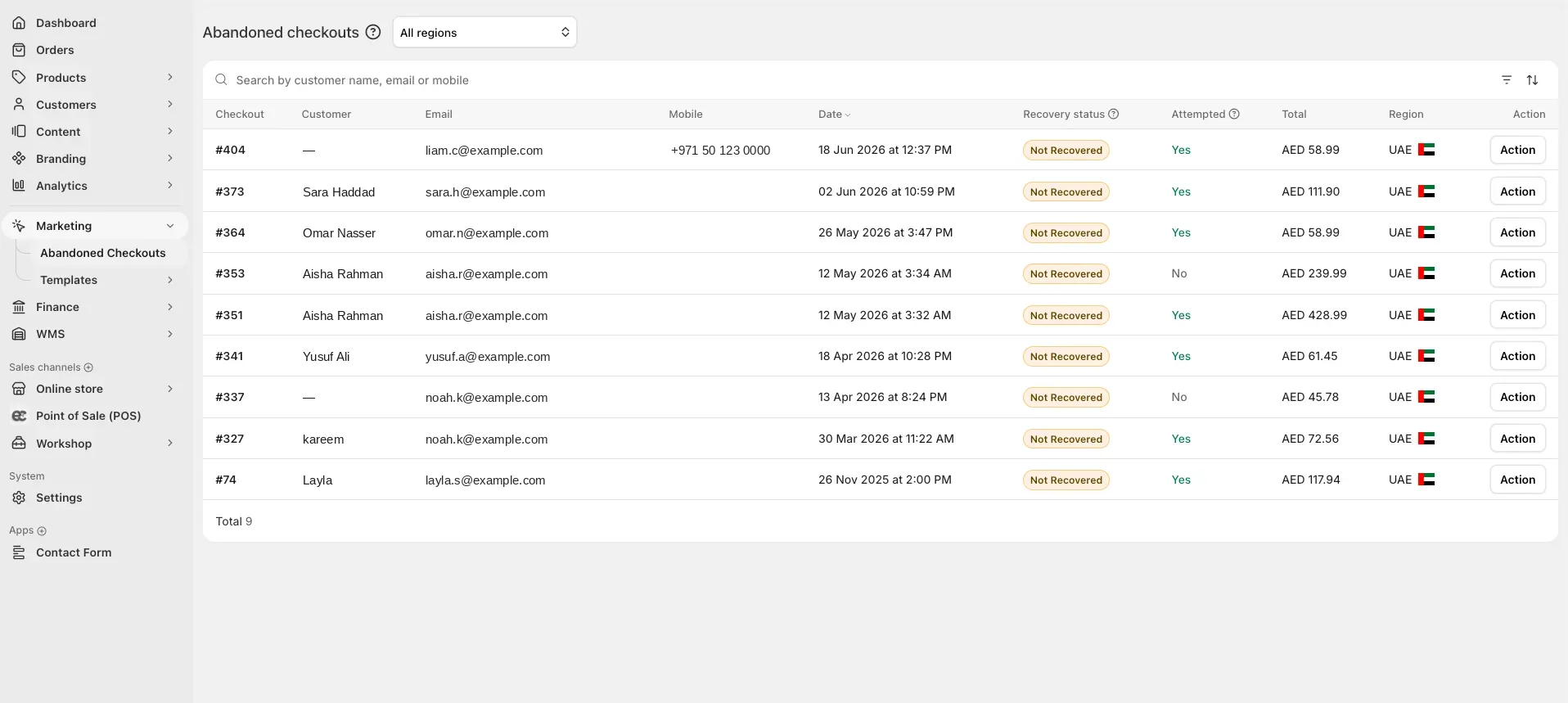
Everything starts with knowing who to reach. Inside EagleCart, the Abandoned Checkouts page gives you a complete list of every customer who started a checkout but did not finish. You can see their name, contact details, the cart total, the date, and whether they have been recovered yet.
This list is your opportunity. Each row is a customer who was genuinely interested in buying. You can quickly see how much each cart was worth, which helps you decide where to focus first. A customer who left an AED 400 cart is worth a personal message, and now you know exactly who they are and how to reach them.
Step 2: Send a WhatsApp Message
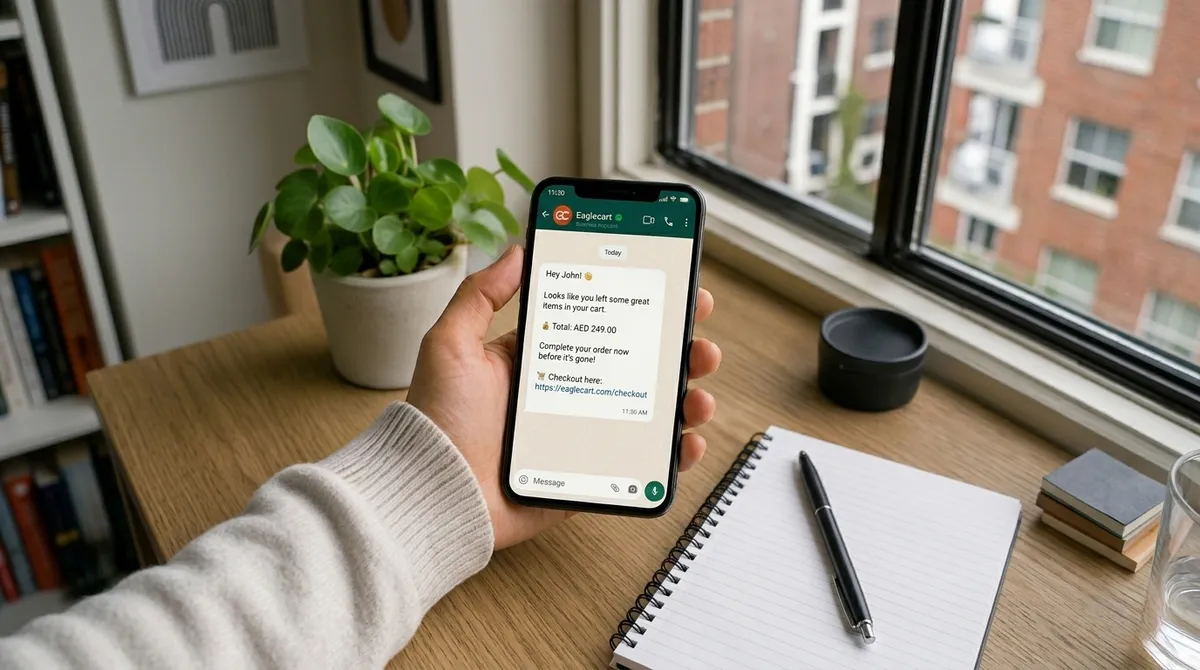
Once you know who to reach, bringing them back is simple. From the same page, you choose a customer and send them a WhatsApp message — as long as that customer has a mobile number connected to their checkout. A live preview shows you exactly how the message will look before you send it, so there are no surprises. When you are happy with it, you simply press Send Now and the message goes straight to your customer's WhatsApp.
You are never stuck with a single message either. You can choose from your saved templates and pick whichever one fits the customer in front of you. One template might be a warm, friendly reminder with a few emojis, while another shows the exact items left in the cart along with the quantity — and the live preview updates instantly the moment you switch, so you always see exactly what the customer will receive.
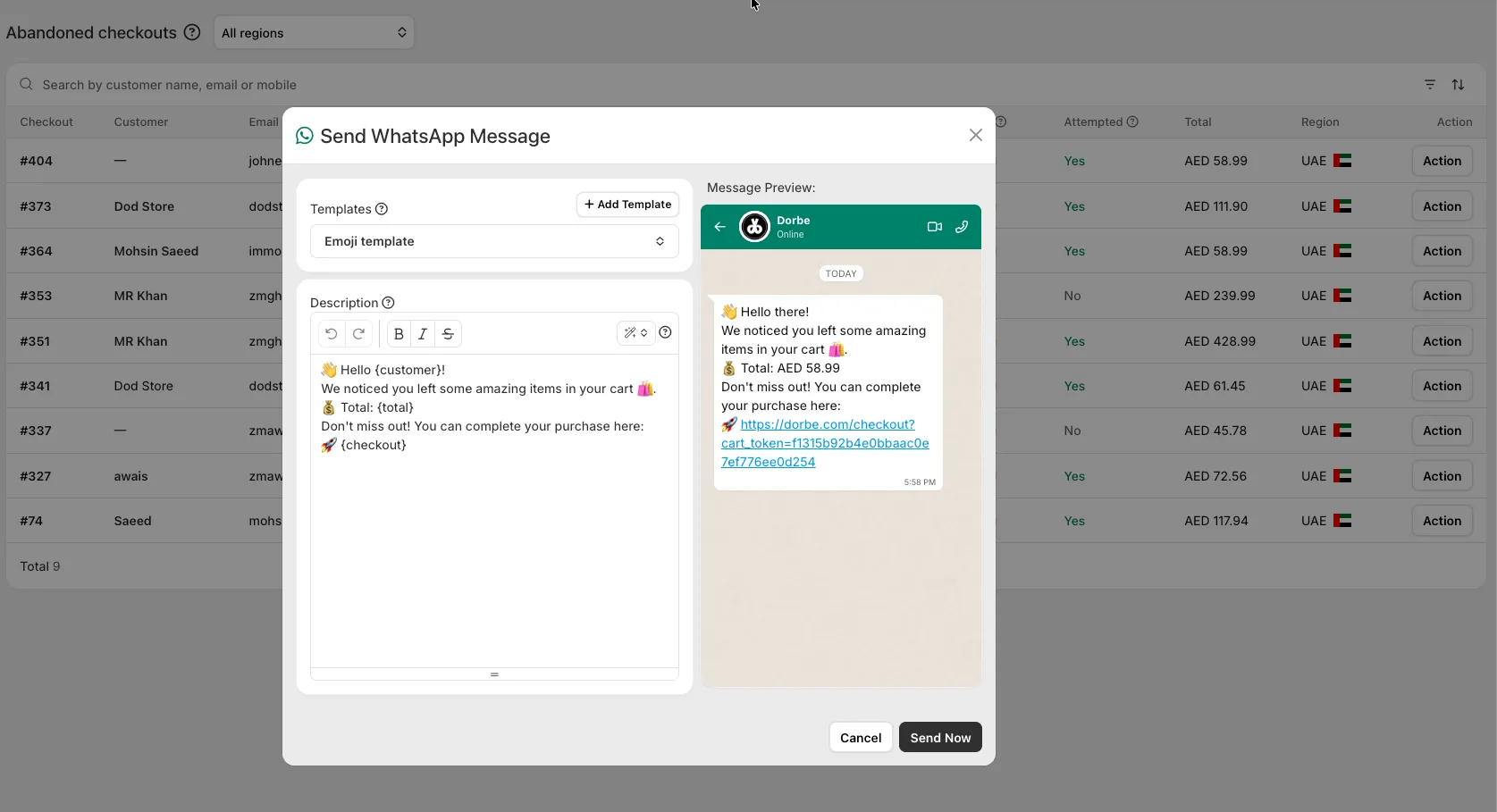
The best part is that one template can work for a thousand customers. Because every template uses variables — like the customer's name, their cart total, and their checkout link — EagleCart fills in the right details for each person automatically. You write the message once, and it personalises itself for everyone you send it to. Whether you are recovering one cart or a thousand, you never have to rewrite a thing.
So whether you want a quick, friendly nudge or a detailed message showing exactly what the customer left behind, you simply pick the template, let the preview confirm how it looks, and press Send Now. The customer gets everything they need — a greeting, their cart, and a link straight back to checkout — in one simple message that feels personal, not automated.
Create Your Own Templates
Once you have sent a few messages, you will want your own saved templates ready to go. This is where EagleCart makes your life easy. You can create as many templates as you want — a friendly one, an urgent one, a playful one with emojis, a discount offer — and keep them all on hand for whenever a customer abandons a cart. Build them once, and they are always there waiting for you.
Creating a template is simple. You give it a name, write your message, and a live preview on the side shows you exactly how it will look on WhatsApp as you type. You can turn it on or off whenever you like, and even set one as your default so it is always ready the moment you open a customer's message.
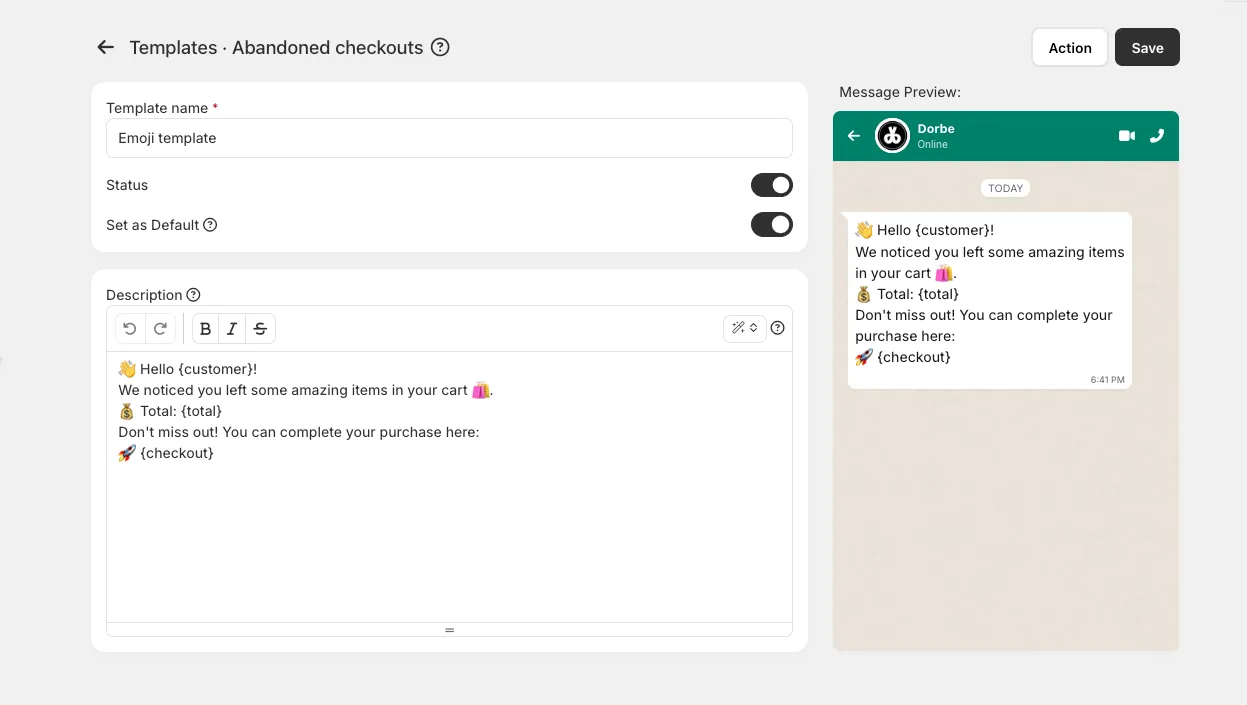
The real magic is in the variables. Instead of typing each customer's name, cart total, or checkout link by hand, you simply drop in a variable — like the customer's name or their cart total — and EagleCart fills in the correct details for each person automatically. You write the message once, and it personalises itself for everyone who receives it.
This is what lets one template work for a thousand customers. One person sees their own name and their own cart total. The next person sees theirs. You never rewrite a thing — you just pick your template, choose the customer, and send. Whether you are recovering ten carts or a thousand, the effort is exactly the same.
So take a few minutes to build the templates that match your store's voice. Once they are saved, recovering an abandoned cart becomes a job that takes just seconds — pick a customer, pick a template, and bring them back to finish their order.
Turn Lost Carts Into Real Sales
Abandoned carts are not failed sales. They are sales waiting to be completed. The customer was already interested, the product was already chosen, and the only thing missing was a small reminder at the right moment. Every cart sitting in that list is money your store has already earned the attention for — it just needs one message to bring it home.
What makes this so powerful is how little effort it takes. You are not running expensive ads or chasing strangers. You are reaching people who already know your store and already wanted to buy. A single WhatsApp message, sent at the right time, often turns a lost cart into a completed order. Do this consistently, and those recovered sales add up to real money every single month.
With EagleCart, the whole process lives in one place and takes just a few clicks. You see exactly who left, send them a personal message on the app they check most, and save templates so the next recovery takes seconds. It is built around how customers in the UAE actually shop — on WhatsApp, in their own language, with a store they already trust.
Start recovering your lost carts today, and turn the sales you were missing into the sales you were meant to make.