How to Track Inventory Across Multiple Locations in UAE
How to Track Inventory Across Multiple Locations in UAE
The moment you open a second location — a second retail outlet, a warehouse separate from your shop, or an online store running alongside a physical one — inventory management becomes a different problem. Because now your stock is in more than one place, and your system probably only sees one of them.
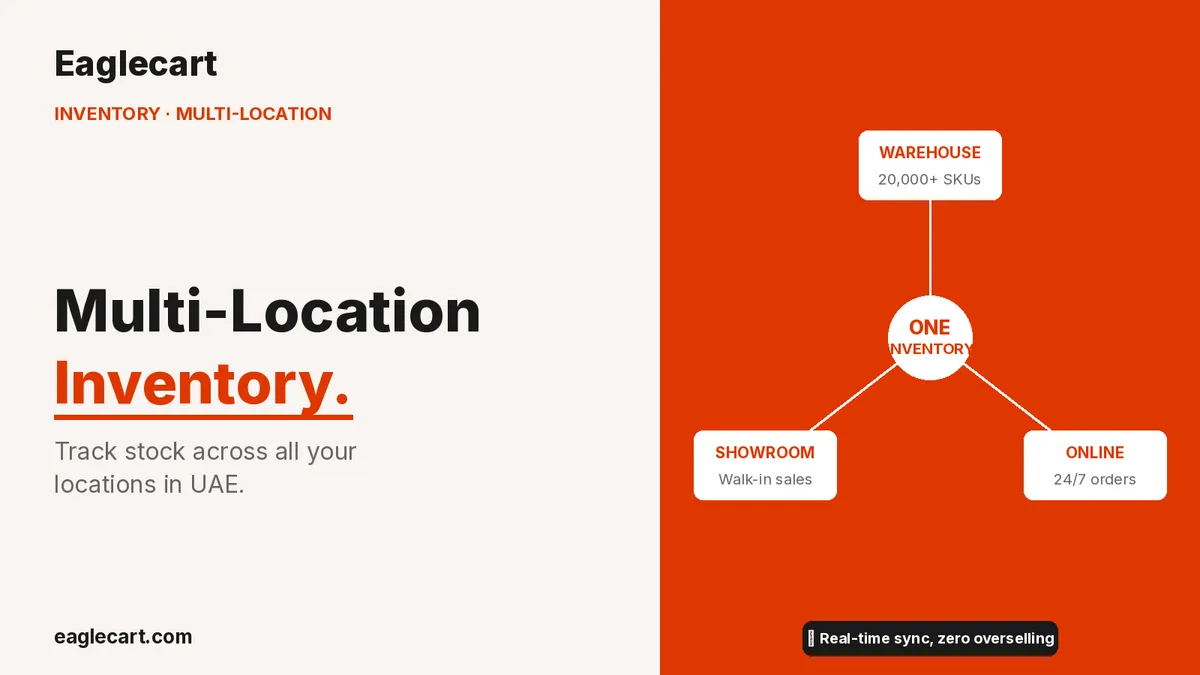
I ran this problem at scale. At our peak we had a 30,000 sq ft ecommerce warehouse, a physical retail showroom, and an online store processing over 1,700 orders a day — with 20,000+ SKUs moving across all three. The same products were needed in all three places simultaneously. Overselling happened when the online store sold stock the showroom had already reserved. Manual reconciliation between locations consumed hours that should have been spent running the business.
Multi-location inventory requires a single system that sees all locations simultaneously — spreadsheets and separate systems create the very problems you are trying to avoid.
Overselling is the most immediate risk of fragmented inventory tracking: selling the same stock twice across two channels.
Stock transfers between locations must be recorded in the system — not handled with WhatsApp messages and manual counts.
Eaglecart tracks inventory by location across your entire operation so you see one accurate picture of your stock at all times.
Why Separate Systems Create Separate Problems
The most common approach when businesses add a second location is to manage each location separately: a spreadsheet for the warehouse, a different system for the POS, and manual reconciliation between them. This works for a day. It breaks within a week.
The warehouse team makes a sale directly to a walk-in customer and records it in their spreadsheet. The online store makes a sale for the same unit before the spreadsheet is updated. Two orders, one unit. Someone gets a phone call telling them their order cannot be fulfilled. That customer does not come back.
The physical POS at the showroom processes a sale. The inventory in the ecommerce system has not been updated because they are separate systems. The online store shows the product as available. Another order comes in. Same problem, different channel.
Fragmented systems produce fragmented truth. And in a business where customers depend on you to deliver what you promise, fragmented truth is expensive.
What Unified Inventory Management Actually Looks Like
A unified inventory system means one database. Every location — warehouse, showroom, outlet, online store — reads from and writes to the same inventory pool. When a unit sells in the showroom, it decrements from the shared count. When the online store sells the same SKU, it pulls from the same count. No reconciliation required because there is only one truth.
Large corporations have run this way for decades on expensive ERP systems costing hundreds of thousands of dirhams. What changed is that this capability is now available to UAE small and medium businesses at a fraction of the cost — because Eaglecart was built for businesses operating at the scale I was running, not for enterprises with IT departments.
Stock Transfers Between Locations
In any multi-location business, stock moves between locations regularly. The warehouse sends a batch to the showroom. The showroom sends slow-moving items back. One location is running low on a fast-moving SKU and another has surplus.
These transfers must be recorded formally — not via a WhatsApp message and a verbal count. When a transfer is not entered in the system, both locations carry wrong counts. The sending location shows stock it no longer has. The receiving location does not show stock it does have. Both are wrong, in opposite directions.
In Eaglecart, a stock transfer between locations is a formal system entry: the sending location, the receiving location, the SKUs and quantities, and the date. Both locations update simultaneously. The transfer creates a permanent record.
How the POS and Online Store Work Together
One of the most common failure points in UAE retail is the gap between the physical POS and the online store. A customer walks in and buys the last unit of a product. Simultaneously, someone online is completing a purchase for the same unit. Both transactions succeed. One of them cannot be fulfilled.
In Eaglecart, the POS and online store share the same inventory. When a POS sale is processed, the unit count decrements in real time and the online store updates immediately. If the count reaches zero, the online store shows the product as out of stock before another online customer can complete a purchase.
This is not optional when you are selling through both channels at the same time.
Inventory Reporting Across Locations
When your business spans multiple locations, a single total-stock report is not enough. You need to know how much stock is at each location, which locations are overstocked on slow-moving items, which need urgent replenishment, and which SKUs have zero stock anywhere in the business.
That kind of visibility changes how you buy. Instead of ordering more of a product that is overstocked in one location and missing in another, you transfer first and order only when the system-wide count genuinely requires it. That alone reduces unnecessary purchasing costs and the capital tied up in excess inventory.
Eaglecart's inventory reports show stock by location so you always know exactly where your inventory is and what the true count is at each point in your operation. The system is available from AED 399 per month for warehouse operations. Visit eaglecart.com to start your free trial.
One inventory. Every location. Real time.
Eaglecart tracks stock across your warehouse, showroom, and online store from one dashboard — from AED 399/month.
Start Free at eaglecart.comFrequently Asked Questions
What is multi-location inventory management?
It is tracking stock across more than one location — warehouse, retail store, online store — from a single unified system. Every channel sees the same accurate count. No reconciliation, no overselling from out-of-sync data.
How do I prevent overselling when I sell online and in-store at the same time in UAE?
Use a platform where both channels share the same real-time inventory pool. Eaglecart synchronises inventory across POS and online store in real time — the same unit cannot be sold twice across two channels.
How should stock transfers between warehouse and showroom be recorded?
Every transfer must be entered formally in your inventory system with the sending location, receiving location, SKUs, quantities, and date. Eaglecart's stock transfer function updates both locations simultaneously when the transfer is logged — no manual reconciliation needed.
Can I see inventory reports by location on Eaglecart?
Yes. Eaglecart's inventory reporting shows stock levels by location so you can see exactly how much of each product sits at each point in your operation. Use it to identify surplus in one location, shortfall in another, and make transfer or purchasing decisions from accurate data.
What is the risk of using separate spreadsheets for different locations?
Each spreadsheet is accurate only at the moment it was last updated — and in a busy operation, updates always lag behind sales. The result is overselling, wrong purchasing, failed deliveries, and customer service failures from stock data that never quite matches reality.
At what point does a UAE business need multi-location inventory management?
The moment stock in more than one location feeds any common sales channel. If your warehouse and online store share inventory, you need a unified system. Operating without one is accepting a structural error that compounds every single week.