How to Set Up Payments in Your UAE Online Store: COD, Stripe, Tabby and Tamara
How to Set Up Payments in Your UAE Online Store: COD, Stripe, Tabby and Tamara
You set up every payment method from one screen in Eaglecart: Settings, then Payments. Card payments through Stripe, instalments through Tabby and Tamara, and cash on delivery all live on that page, and each one is configured per region.
Nothing needs installing. Every method is already integrated, so connecting one means pasting in your own credentials from that provider and saving. The harder question is which to switch on first, and that depends entirely on what your products cost.
Key Takeaways
All payment methods sit under Settings, then Payments, and are configured per region.
Cash on delivery is active by default, so a new UAE store can take orders on day one.
Tabby and Tamara are fully integrated — paste your merchant credentials and they go live within a minute.
Stripe handles cards with 3DS, connected to your own account, with 0% taken by Eaglecart.
Where do you set up payment methods in Eaglecart?
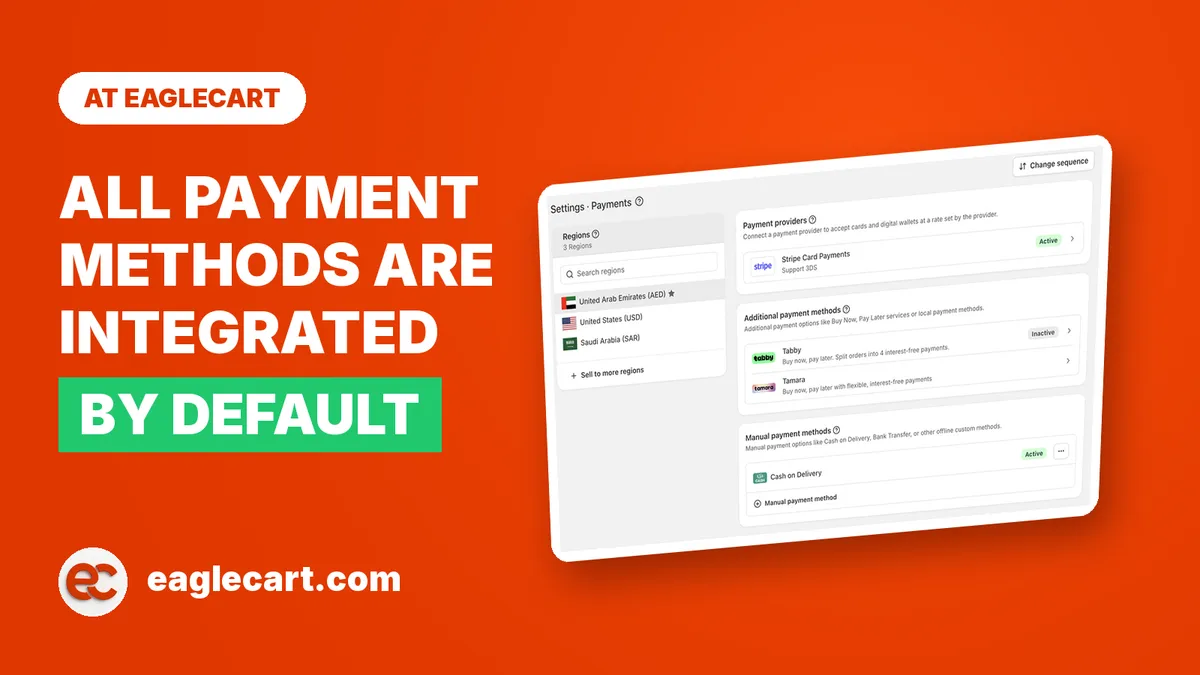
Go to Settings, then Payments. Choose your region on the left, and the page splits into three groups.
Payment providers holds Stripe Card Payments. Additional payment methods holds Tabby and Tamara. Manual payment methods holds cash on delivery, plus anything else you take offline such as bank transfer. There is also a Change sequence button at the top, which controls the order your methods appear in at checkout.
Everything is set per region, not per store. Your UAE setup stays exactly as it is when you add Saudi Arabia or another market later, and each region can run a different mix.
How do you enable cash on delivery in the UAE?
You do not have to. Cash on delivery is already active under Manual payment methods when your store is created, so it works from your first order.
That default is deliberate, and it comes from what I watched happen every day at DODuae. Our average order value was AED 80 to 120 on generic products, and 83% of those orders came in as cash on delivery. The reason was always one of three. Some customers did not hold a Visa or Mastercard. Some held one but had never bought anything online with it and did not want to learn on our checkout page. And a large group had the card, knew how to use it, and still would not type the number into a website they had never bought from before.
That third group is the one people miss. It is not a payments problem, it is a trust problem, and no gateway fixes it. Cash on delivery does, because the customer risks nothing until the box is in their hand. If you sell generic or lower-priced goods to working and middle-income customers in the UAE, cash on delivery is not a fallback, it is your primary method.
How do you connect Stripe to your online store?
Open Settings, then Payments, and find Stripe Card Payments under Payment providers. Open it and connect your own Stripe account.
Two things matter here. The account is yours, so card money settles into your Stripe balance and not into an Eaglecart account. And 3DS is supported, which is the authentication step UAE banks apply to online card payments.
Eaglecart takes 0% transaction fee on top. The only cut is your provider's, which in the UAE usually lands around 2.4% to 2.8% of the sale plus roughly AED 1 per order. Confirm your exact rate with your provider, because it moves with category, volume and contract.
Run that maths against your basket before you assume cards are cheap. On a AED 60 order, AED 1 plus 2.5% is close to 4% of the sale. On a AED 3,000 order it is under 3%. Card fees punish small baskets, which is another reason cash on delivery survives at the low end of this market.
How do you connect Tabby to your store?
Open Settings, then Payments, choose your region, and open Tabby under Additional payment methods. Paste in the credentials from your own Tabby merchant dashboard, save, and it is live at checkout within a minute.
There is nothing else to it. The integration is already built, so you are not installing an app, requesting a developer, or waiting on anyone to enable it at our end. You need a Tabby merchant account first, and the credentials come from inside that account.
Once it is on, the customer sees the option to split the order into four interest-free payments.
How do you connect Tamara to your store?
Exactly the same way. Settings, then Payments, then Tamara under Additional payment methods. Enter the credentials from your Tamara merchant dashboard, save, and your customers can split into up to four interest-free payments for that region.
You can run both at once. Some UAE customers have one account and not the other, so offering both catches more of them than picking a side.
Before you switch either on, understand the trade. The instalment service fee is paid entirely by you, not the customer. You are buying a higher conversion rate and a higher average order value with margin. On a AED 60 item that maths rarely works. On a AED 1,500 item it almost always does, because a AED 1,200 sofa stops feeling like a AED 1,200 decision once it reads as four smaller ones.
Which payment method should you turn on first?
Let your average order value decide, not your preference.
Under AED 150, lead with cash on delivery and treat cards as secondary. Above AED 500, turn on cards and instalments together, because that is the range where their fee actually buys you something. If you sell across both, run all of them and let the customer choose.
Then use Change sequence, and think about it properly. The method listed first is the one most customers take. Put the one that fits your category at the top, not the one that flatters your margin.
The checkout itself was rebuilt from the ground up in August 2026 — same steps and same fields, but faster, cleaner, and built to convert. Whichever methods you switch on, they appear inside that.
What happens to a cash on delivery order after checkout?
With cash on delivery, the delivery attempt and the payment are the same event, so your payment setup and your delivery setup stop being separate problems.
If the customer is not home, you have not lost a delivery, you have lost the sale until the driver goes back. That is why every Eaglecart order carries three independent statuses: order, payment and fulfillment. An order can be Delivered and still Unpaid. It can be Paid and still In Transit. Return to Origin is its own fulfillment status rather than a note in a comment box, because RTO is a real cost line and you cannot manage what you cannot see per order.
Reducing failed attempts is mostly about the customer knowing when to expect the driver. Your customers see a shipment card on their own order page showing the courier, the tracking number and the parcel's journey. GetGive and Jeebly are integrated for booking shipments directly, and Jeebly pushes each shipment event back to Eaglecart as it happens, so statuses move without anyone updating them by hand.
If you already use a courier we do not integrate with, custom tracking covers you. Record the shipment against the order with its tracking number and your customer still gets proper tracking on their order page. Shipping zones and rates are set per region too, so a rule like free delivery above AED 99 with a standard charge below it takes about a minute.
Frequently Asked Questions
Are Tabby and Tamara available in Eaglecart?
Yes, both are fully integrated. You enter the credentials from your own Tabby or Tamara merchant dashboard on the Payments page, and the option is working at checkout within a minute.
How do I connect Tabby to my online store?
Go to Settings, then Payments, choose your region and open Tabby under Additional payment methods. Paste your Tabby merchant credentials, save, and customers can split their order into four interest-free payments straight away.
How do I connect Tamara to my store?
Same screen as Tabby. Open Tamara under Additional payment methods, enter the credentials from your Tamara merchant dashboard, and save. Customers can then split into up to four interest-free payments, and you can run Tabby and Tamara together.
How do I connect Stripe to my UAE online store?
Open Settings, then Payments, and connect your own Stripe account under Payment providers. Card payments settle into your Stripe balance, 3DS is supported, and Eaglecart takes 0% on top.
How do I enable cash on delivery on my website?
It is already on. Cash on delivery is active by default under Manual payment methods, so your store can take COD orders from day one. The same section is where you add other offline methods such as bank transfer.
Who pays the Tabby or Tamara fee, me or the customer?
You do, in full. The customer splits the total into interest-free payments at no extra cost to them, which is exactly why instalments convert so well on higher-priced goods.
Can I choose which payment method shows first at checkout?
Yes, using Change sequence at the top of the Payments page. It is worth setting deliberately, because the method listed first is the one most customers take.