
Tracking & Analytics
Now in Integrations — organised per platform and per region, with server-side tracking where it's supported.
Tracking & Analytics
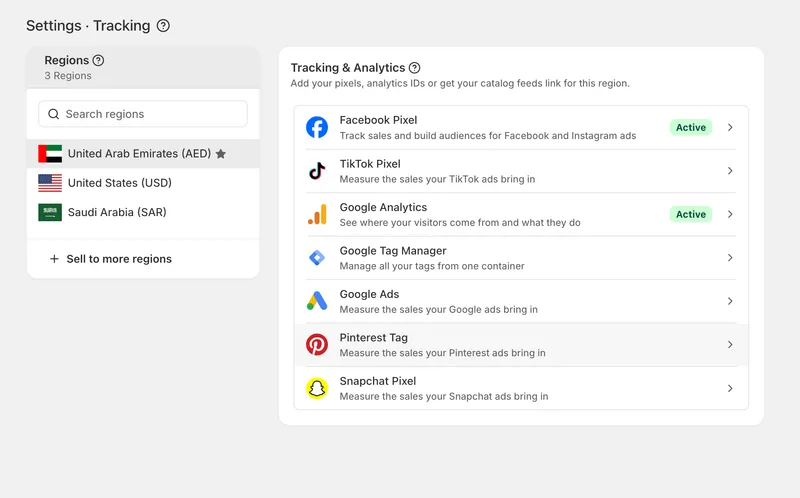
Your tracking and analytics are now available in Integrations. Everything is organised per platform and per region, with server-side tracking available for the platforms that support it.
Add more than one of each
You're no longer limited to a single ID per platform. Add multiple of any pixel or tag in a region — useful when you run your own alongside an agency's or a partner's. Give each one a label so you can tell them apart at a glance, switch any of them on or off without deleting it, and delete the ones you no longer use.
Settings are now per region
Each region keeps its own pixels and tags. If you sell in more than one region or market with separate ad accounts, each can report to its own — and if you use one account everywhere, add the same ID in each region.
Platforms
Google Analytics, Google Tag Manager, Google Ads, Facebook Pixel, TikTok Pixel, Pinterest Tag and Snapchat Pixel each have their own page now, with setup guidance written for the current version of each platform's dashboard.
Google Ads now reports your sales
Previously the Google Ads tag only built remarketing audiences. Add your conversion label and Google will now receive your orders, so your campaigns report a real return and can bid towards more of them. Paste the whole value Google gives you and we'll split it for you.
Built-in server-side tracking for Conversion APIs
Facebook, TikTok, Snapchat and Pinterest can now receive your events directly from our servers as well as from the browser. Browsers and ad blockers stop a growing share of pixel events, and each one lost is a sale the platform cannot credit to your ads — sending them from our side as well closes that gap.
Both sides carry a shared ID, so each sale is counted once, never twice. Your browser pixel keeps working exactly as before.
Add your access token on the platform's page to switch it on. Tokens are stored securely and never shown back to you.
Test before you go live
Facebook, TikTok and Pinterest let you check your setup before it affects your reporting. Enter a test code, place a test order, and watch it arrive in the platform's own test view. Test mode is clearly marked in your settings so it can't be left on by accident.
Guides built in
Every platform page has a step-by-step guide covering where to find your ID, how to generate an access token, and answers to the questions merchants ask most — including what to do when the option you're looking for isn't visible.
More complete events
Product views, add to cart, checkout and purchase are now sent to every platform you've connected, with product IDs, prices and currency attached. Purchases carry your order ID, so refreshing the confirmation page can never report a second sale.
Your existing settings
Everything you had set up has been moved across automatically. Nothing to do.


