
Product feeds — new
One link keeps Facebook, TikTok and Pinterest showing real products, prices and stock.
Product feeds
Facebook, TikTok and Pinterest can now pull your full product catalogue directly from your store, so their ads show real products with current prices and stock instead of a static image.
One link, all three platforms
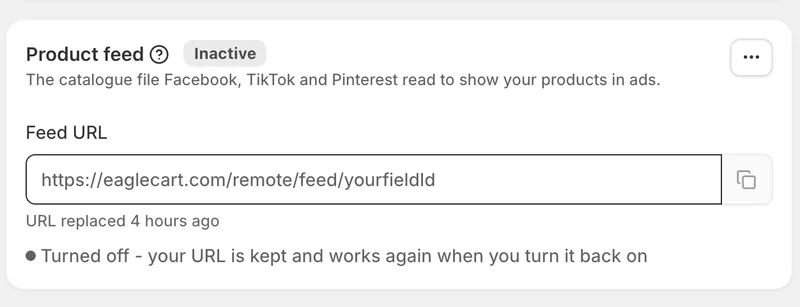
Turn the feed on and you get a URL. Paste it into Facebook's Commerce Manager, TikTok's Catalogue and Pinterest's Catalogues — the same link works everywhere. They collect it on their own schedule and your catalogue stays current without you touching it again.
Per region, like everything else
Each region gets its own feed with its own prices, currency and stock, so the right prices reach the right market. Set one up in each region you advertise in.
Every variant is its own product
A t-shirt in three sizes becomes three catalogue entries, each with its own price, image and stock, grouped so the platforms know they belong together. Someone who viewed the medium sees the medium in their ads.
What gets sent
Titles, descriptions, images, prices, sale prices, stock, brand, barcode and Google category — everything the platforms need to approve and advertise your products. Prices include tax exactly as your storefront shows them.
You choose what goes in
Send online store products only, or everything you sell. Set a minimum stock level, so you stop paying for clicks on the last one in the warehouse, and choose whether low-stock products are left out or sent marked unavailable. Products with no image can be skipped, since the platforms reject them anyway.
Custom labels and numbers
Ten slots you can filter on inside Facebook and TikTok when building product sets. Pick a rule and every product gets its value automatically — collection, vendor, price band, stock level, how long it has been listed, whether it is on sale, discount percentage, margin percentage.
That means a "clearance" campaign or a "new arrivals" set keeps itself current instead of you maintaining a list. Set your own thresholds for what counts as cheap, low stock or new.
Know it is working
The page shows how many products are in your feed, when it was last built, and when a platform last collected it. That last one answers most questions — if a price change has not appeared yet, it is usually because the platform has not collected since you made it.
Rebuild whenever you want
Your feed refreshes itself as the platforms collect it. If you have just made a change and want it out now, use Rebuild.
Your link, your control
If you have given the URL to an agency and the relationship ends, replace it. The old link stops working immediately and you paste the new one wherever you still want it. Turning a feed off keeps the same URL for when you turn it back on.


