
Tabby is now available on Eaglecart
Split into 4 interest-free payments — enable it yourself, from your payment settings.
Your customers can now split into 4
Your customers can now split their purchase into 4 interest-free payments with Tabby — and you can enable it yourself, from your payment settings, without contacting us.
Getting set up
Connect your Tabby merchant account by entering your merchant code and API keys in Payments → Tabby. We verify them with Tabby immediately, so you'll know at once whether they're correct rather than discovering a problem on your first live order.
We also register your payment notifications with Tabby automatically. There's no URL to copy, no dashboard configuration on their side, and nothing to keep in sync. Your settings page shows when Tabby last contacted us, so you can confirm the connection is healthy at a glance.
Tabby is available in the UAE, Saudi Arabia and Kuwait. If your store sells in a currency Tabby doesn't operate in, it simply won't appear — no misconfiguration, no confused customers.
At checkout
Tabby appears alongside your other payment methods with its logo and a short line explaining what happens next. The customer is taken to Tabby to complete their purchase and returns to your order confirmation.
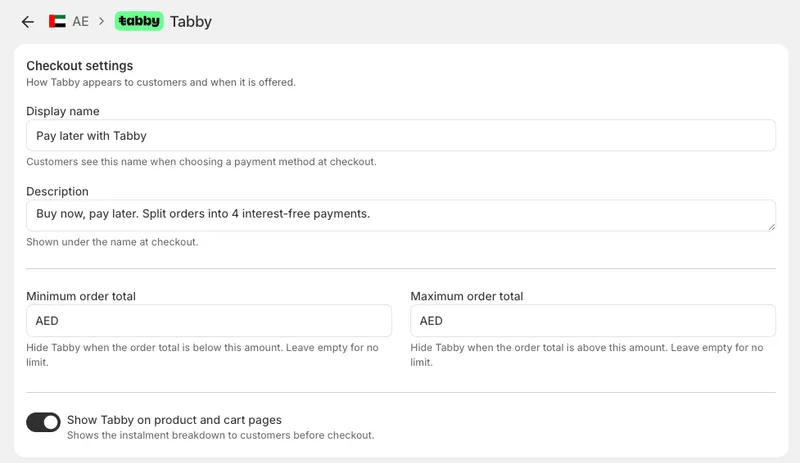
You control when it's offered. Set a minimum or maximum order value in the Tabby settings and it appears only for baskets that qualify. If Tabby declines a particular customer, they see a clear explanation and can pick another payment method — they're never left stuck.
Orders are created reliably whether the customer returns to your store or closes the tab, because Tabby notifies us directly as well.
Across your store
Tabby works best when customers know about it before they reach checkout — so we've built the instalment messaging into your product and cart pages too.
On product pages
Shoppers see what they'd pay per instalment, under the add-to-cart button. The figure updates as they change quantity, pick a variant or add paid options, so it always reflects what they'd actually be charged.
In the cart and cart drawer
The same messaging appears against the order total.
This is a single switch — "Show on product and cart pages" in your Tabby settings — and it applies everywhere at once. Nothing to add in the theme editor, nothing to configure per page. It respects the same order-value limits you've set for checkout, so a customer is never shown instalments on a basket Tabby would decline. And stores that don't use Tabby load nothing extra.
More payment methods on the way
Tabby is the first of several local payment methods we're bringing to the platform. Tamara is coming soon, and we're working on further regional providers — including local card processing and additional buy-now-pay-later options for the UAE and wider GCC.
Everything we've built for Tabby is designed to carry the next provider without further work: when Tamara arrives, it will appear in your payment settings the same way, with the same automatic setup, and its instalment messaging will already know where to sit on your product and cart pages.


