
New: Shipments page
A dedicated workspace for getting parcels out the door, built for doing many at once.
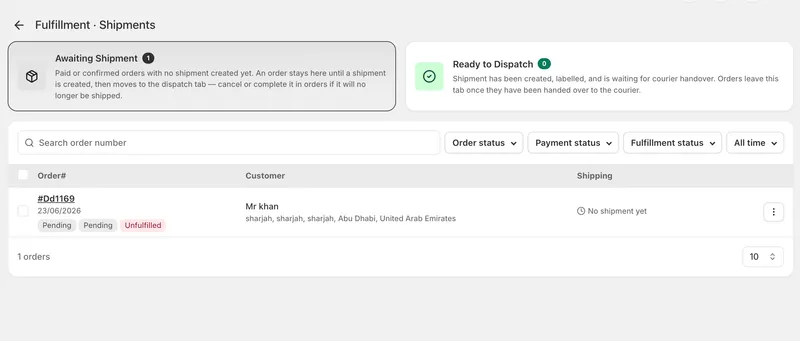
A dedicated workspace for shipping
The new Shipments page is a dedicated workspace for getting parcels out the door, built for doing many at once.
Two clear queues
Each queue shows its size before you open it.
Awaiting Shipment
Orders with no shipment yet. Cancelled and completed orders stay out of the way, so what you see is what actually needs doing. Oldest first, so nothing quietly waits three weeks.
Ready to Dispatch
Labelled parcels waiting for the courier. This is your printing and handover queue.
Getting through the work
The page is built around moving quickly through a pile of orders rather than opening them one by one.
Select and ship
Tick the orders, choose a courier, done. The action bar only appears once you've selected something, and it only offers what your selection can actually do.
Print what you need
Packing slips and shipping labels, on A4, 4x6 thermal labels or 80mm receipt paper. Print for one order or fifty in a single job. Documents open ready to print, or download them to keep.
Mark parcels as handed over
When the driver takes the pile, select them and mark them in one action. They leave the dispatch queue and their fulfilment status updates automatically.
Find things fast
Filter by order, payment or fulfilment status, or by date — today, yesterday, last 7 or 30 days. Search reaches any order, including ones that have already shipped.
Built to be honest with you
Orders missing a shipping address are shown with a clear warning rather than hidden, so you can fix them instead of wondering where they went. When orders can't be included in what you're doing, we tell you exactly how many and why.
Fulfilment status updates itself as you work — creating a shipment marks the order ready for dispatch, handing it over moves it on. No separate bookkeeping.


