How to Create a Quotation That Wins — and Convert It in One Step
How to Create a Quotation That Wins — and Convert It to an Invoice in One Step
In most B2B transactions in the UAE, the quotation is the moment the deal is won or lost. Not the final negotiation, not the relationship, not the price alone — the quotation. Because the quality of a quotation tells the customer how professional your business is before they have experienced anything else you offer.
A late quotation loses to a faster competitor. A poorly formatted one — missing VAT, no TRN, numbers that do not add up — raises doubt about whether you can execute the actual job. A quotation that arrives in English when the customer prefers Arabic creates friction at the most sensitive moment. And a quotation that then requires manual retyping to produce the invoice creates delays and errors when you need to close the deal fast.
Speed and professionalism win quotations in UAE — the first credible, well-formatted quote often gets the job.
A compliant UAE quotation should include your TRN, itemised pricing, VAT calculation, and be available in Arabic and English.
Converting a quotation to an invoice manually means retyping the same data twice — creating unnecessary delay and error risk.
Eaglecart converts a quotation to a locked VAT invoice in one click, with no data re-entry and full bilingual support.
What Makes a UAE Quotation Win
I ran a business that imported products and supplied other businesses across the UAE. We issued hundreds of quotations. The pattern never changed: when our quote was the first to arrive, formatted clearly, with the customer's name spelled correctly, items priced individually rather than as a lump sum, and VAT broken out separately, we won the business at a higher rate than when we sent the same prices days later in a poorly formatted document.
Price matters. But in the UAE B2B market, professionalism matters almost as much. A business owner receiving two quotes at roughly the same price will go with the one that looks like it comes from a more organised, more reliable operation.
Your quotation is your first impression of your operational quality.
The Essential Elements of a Professional UAE Quotation
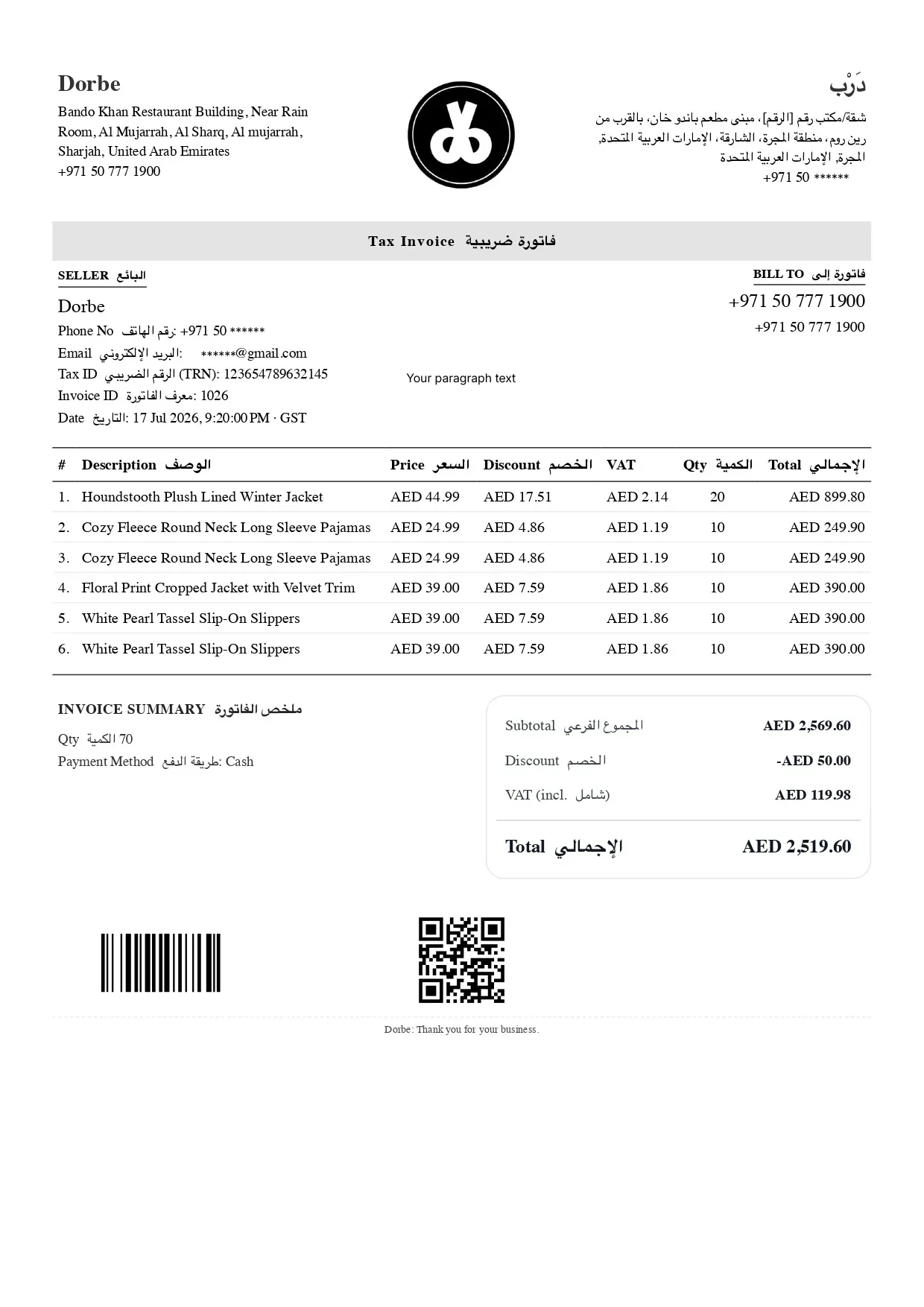
A quotation that wins is not complicated — it just needs to be complete and clean. The customer's name and contact details must be correct. Nothing signals disorganisation like a misaddressed quote. Your business name, address, and TRN go at the top. Each item gets its own line — description, quantity, unit price, and any applicable discount.
VAT must be calculated and shown as a separate line. Not buried in the unit price, not omitted and left for the customer to wonder about. The total should be unambiguous. Always include a validity date — prices change, and a quotation without one creates problems when a customer comes back six months later expecting the same price.
In the UAE, a customer signature field on the quotation is common practice, particularly for services and larger transactions. It serves as evidence that the customer accepted the scope and price before work commenced — which protects you from the "but I didn't agree to that" conversation after the job is done.
Why Arabic Quotations Win More Business
Many UAE business owners default to English for quotations because their software only supports English. But a significant portion of UAE businesses — particularly SMEs, family-owned trading companies, and businesses run by Arabic-speaking owners — respond far more positively to a quotation that arrives in their language.
A bilingual quotation removes this friction entirely. It says: we respect your preference, we prepared this for you specifically. That signals a level of care that a generic English document cannot match.
On Eaglecart, every quotation is generated in both Arabic and English simultaneously. You fill in the details once, the system produces a bilingual document. The Arabic version has correct RTL layout, proper Arabic number formatting, and all required fields labelled in Arabic. You do not write two documents — you produce one bilingual one.
Custom Items and Catalogue Products
A good quotation system handles both catalogue products — items already in your inventory with established prices — and custom line items: services, one-off items, or products not in your standard catalog. Most real-world quotations include a mix of both.
In Eaglecart, you can add products directly from your catalog — they pull through with the correct price and description — or add custom items with a free-form description and price. Discounts can be applied at the line level or as a total discount. The VAT calculation adjusts automatically.
Converting the Quotation to an Invoice — the Right Way
When the customer approves the quotation, the deal is done. What happens next should be simple: the quotation becomes an invoice, the customer gets billed, the business moves on. What happens in reality with manual systems is different. Someone finds the quotation document, re-enters all the line items into an invoice template, checks the totals match, generates the invoice, and sends it. This takes time. Errors happen. Invoices get delayed — and delayed invoices delay cash flow.
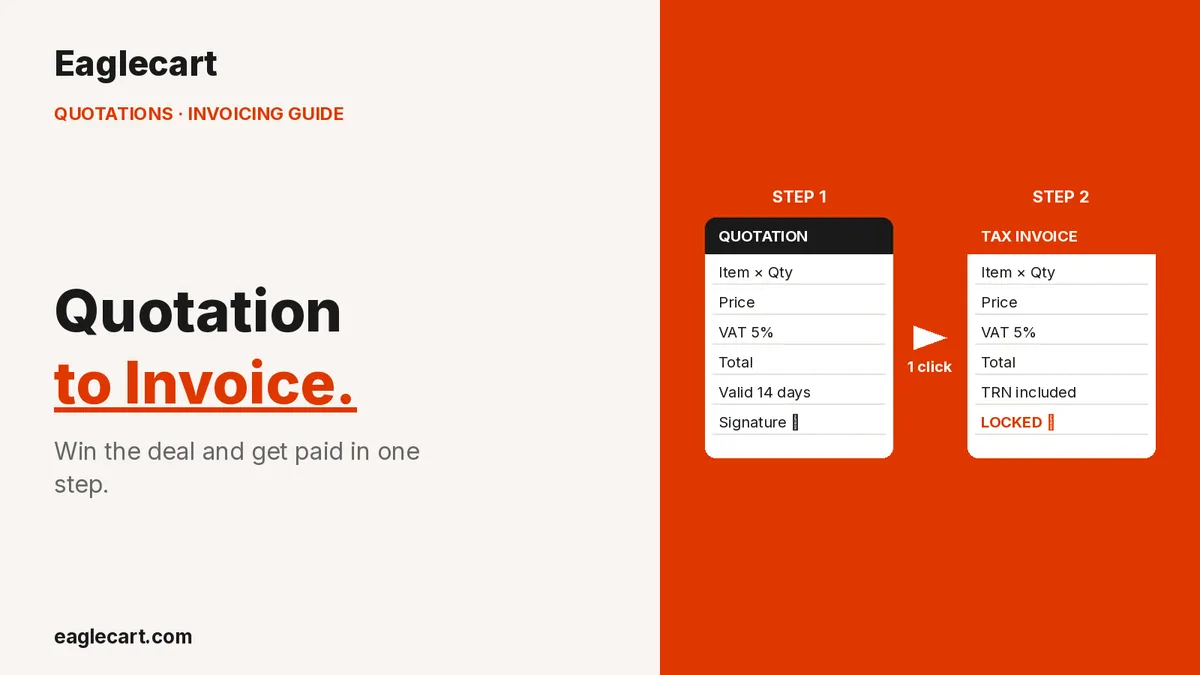
In Eaglecart, you click "Convert to Invoice" and the quotation becomes a locked VAT invoice. Locked means it cannot be edited — it is a faithful reproduction of what the customer agreed to, with a sequential invoice number, your TRN, the full line-item breakdown, and the VAT amount. Nothing is re-entered. Nothing can go wrong in transcription. The invoice is ready to send in under a minute.
The workflow is: create quotation → send to customer → receive approval → convert to invoice → send for payment. Five steps, no duplicated work, no errors.
Tracking Quotation Status
Not every quotation converts immediately. Some are under review. Some are approved but the customer has not formally confirmed. Some are lost to a competitor. Tracking the status of your open quotations is how you manage your pipeline and know where to follow up.
Eaglecart shows all quotations by status — draft, sent, approved, converted, or cancelled. You can see at a glance which quotes are open and overdue for follow-up. Deals do not fall through because the quote was forgotten.
Quotation and invoicing features are available from AED 99 per month on Eaglecart. Visit eaglecart.com to start your free trial.
Send better quotations. Win more business in UAE.
Bilingual Arabic and English quotations, one-click invoice conversion, VAT included — Eaglecart from AED 99/month.
Start Free at eaglecart.comFrequently Asked Questions
Does a quotation need to include VAT in UAE?
Yes, if you are VAT-registered. Show VAT as a separate line — never buried in the unit price. Presenting a VAT-exclusive price and adding it later on the invoice creates disputes. Eaglecart calculates and displays VAT automatically on every quotation.
How long should a quotation be valid in UAE?
Standard practice is 7 to 30 days, depending on whether your supplier prices are volatile. Always include a validity date — without one, a customer can come back months later expecting the same price. Eaglecart lets you set a validity period on each quote so the expiry date is visible to the customer.
Can a customer sign a quotation electronically in UAE?
Yes. Electronic signatures are recognised under Federal Law No. 1 of 2006 on Electronic Commerce and Transactions. Eaglecart's quotation documents include a signature field for customer authorisation.
What happens to a quotation once it is converted to an invoice on Eaglecart?
The quotation is marked as converted and locked — it cannot be edited. A new invoice is created with a sequential invoice number, all original line items, VAT breakdown, and bilingual Arabic and English versions ready to send.
Can I create a quotation from my product catalogue on Eaglecart?
Yes. Products pull through from your inventory catalogue with their existing description and price. You can also add custom line items for services or products not in the catalogue. Discounts and VAT are applied automatically at the line or total level.
How does Eaglecart handle quotation status tracking?
All quotations are tracked by status: draft, sent, approved, converted, or cancelled. You see the full pipeline at a glance and can identify which quotes need follow-up before a deal goes cold.