
Shipping gaps now get flagged before they cost you a sale
Your shipping page now checks for uncovered order ranges and warns you before customers hit them.
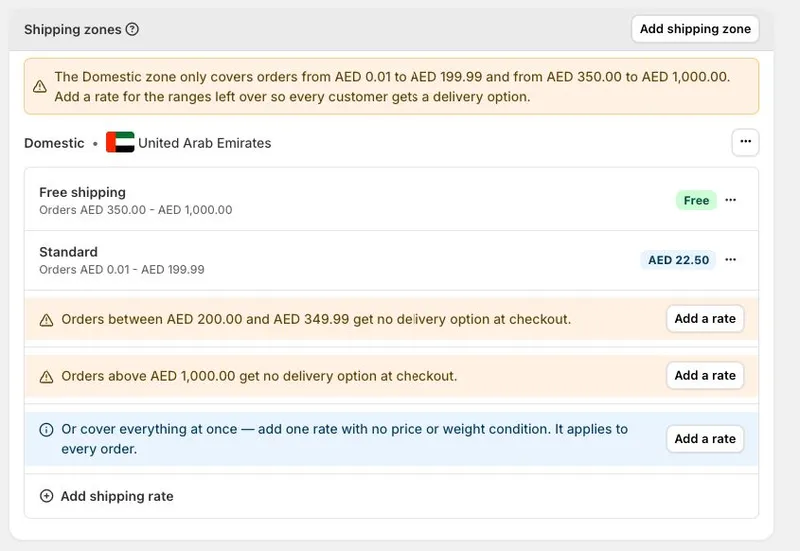
How a gap happens
When you set rates by order value or weight, it's easy to leave a gap without noticing. If one rate covers orders up to AED 199.99 and free shipping starts at AED 350, nothing covers the orders in between — and those customers can't check out. The same happens above your highest rate: if every rate has a maximum, big orders get left out too.
Your shipping page checks for you
Where there's a gap, you'll see which orders are affected in plain terms, a summary of what your zone does cover, and a button that opens the rate form with the missing range already filled in. There's also a label on the Shipping and delivery page so you can spot it without opening the zone.
Two more cases we'll flag
You'll get a heads-up in two other cases: when you ship to only some emirates or states of a country, and when a zone mixes weight and order value rates, since the weight rates take over and hide the others at checkout.
Stays out of your way
The messages appear and clear on their own as you change rates, and never stop you saving. Add one rate with no conditions and you won't see them at all — that rate covers every order.


