
Introducing Reporting
A clear picture of how your store is doing, all in one place — 15 reports, any period, any currency.
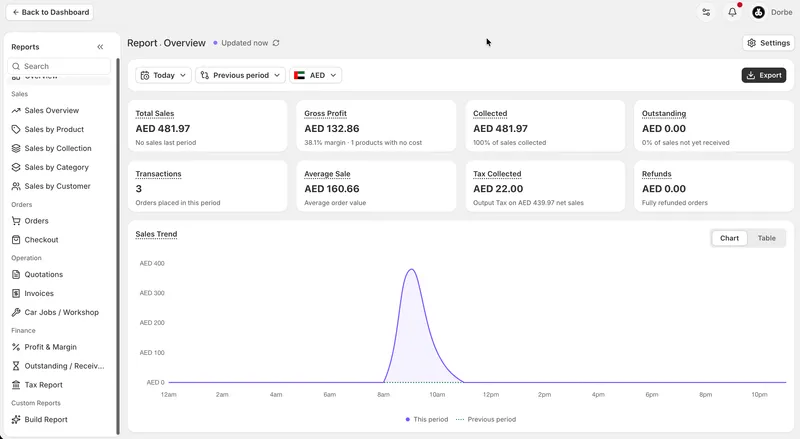
A new home for your reports
Reporting is a whole new domain in Eaglecart, built specifically for understanding your business. It sits apart from your day-to-day admin, with a Back to Dashboard button whenever you're ready to return to your normal dashboard.
Every report you need
Reporting brings together an Overview, Sales Overview, Sales by Product, Sales by Collection, Sales by Category, and Sales by Customer, alongside dedicated reports for Orders, Checkout, Quotations, Invoices, Car Jobs, Profit Margin, Outstanding balances, and Tax. Each one gives you a focused view of that part of your business, without digging through raw lists.
Filter by any period you want
Choose Today, Yesterday, Last Year, Any Time, or set a fully custom range. Every report responds to the period you pick, so you're always looking at exactly the window that matters to you.
See how you're really doing
Compare your numbers against the previous period or against last year, so a good day or a slow month is judged against something real instead of standing alone.
One currency, converted for you
If you sell in multiple currencies, Reporting converts everything into a single currency of your choice, so your numbers add up cleanly instead of mixing currencies together.
Export that matches what you're looking at
Export is tied to your filter, so it exports exactly the data for the time period you have open — not everything, and not the wrong window by mistake.
Works properly on mobile
Reporting is fully mobile responsive, so you can check your numbers from your phone with the same reports and filters you get on desktop.
Settings that stay out of your way
Whatever period you open a report with is saved only on that device, so different people on your team can each work from their own default view without affecting anyone else's. Today and the previous-period comparison open by default, charts use your store's colours, and large figures are shortened — 1,000 becomes K, millions become M, billions become B — so numbers stay readable at a glance. Reports also refresh automatically, so you're not stuck looking at stale numbers.
Build Report — coming soon
We're working on a Build Report tool that lets you put together your own custom report. More on this soon.


