Garage Management Software UAE
Garage Management Software UAE
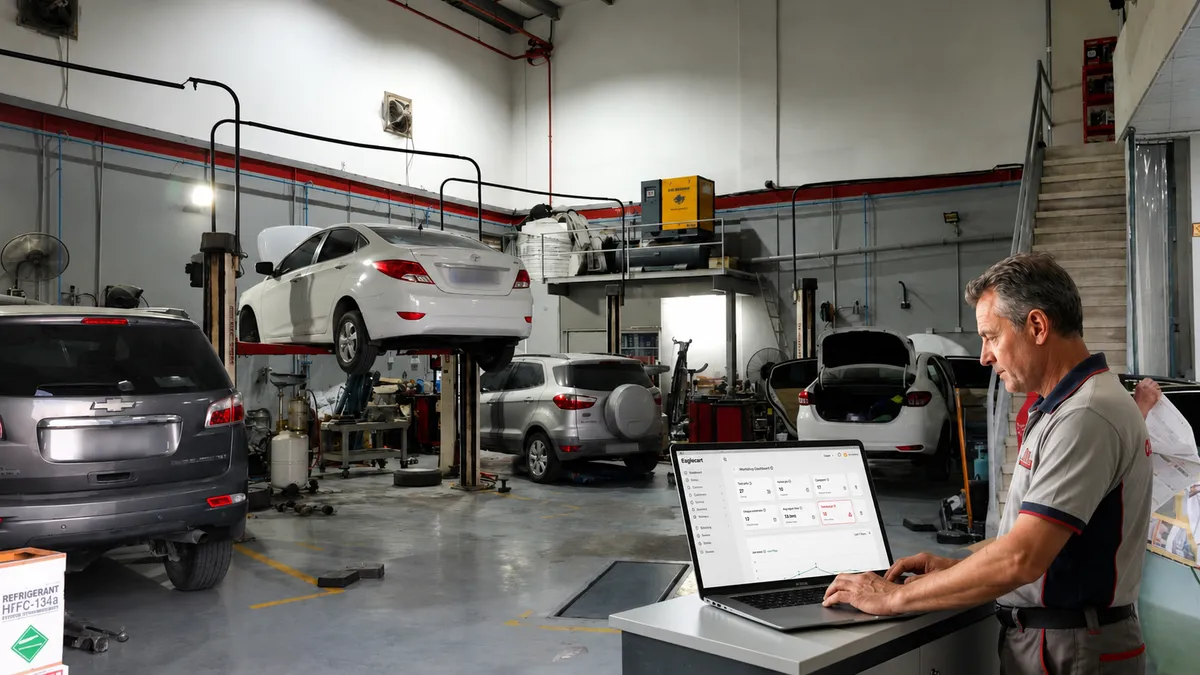
Running a successful auto workshop in the UAE requires much more than repairing vehicles. Every vehicle that enters the workshop follows a journey that starts with customer registration and ends with vehicle handover. Along the way, workshop staff must record vehicle details, perform inspections, assign technicians, prepare quotations, manage parts, generate invoices, and communicate with customers.
Many workshops still manage these processes using paper forms, spreadsheets, and WhatsApp messages. While this may work for a small operation, it becomes increasingly difficult as the number of vehicles grows.
Modern garage management software helps workshops manage the entire repair process from one platform while providing complete visibility into every vehicle, customer, and repair order.
Step 1: Create The Customer
Every workshop job starts with the customer.
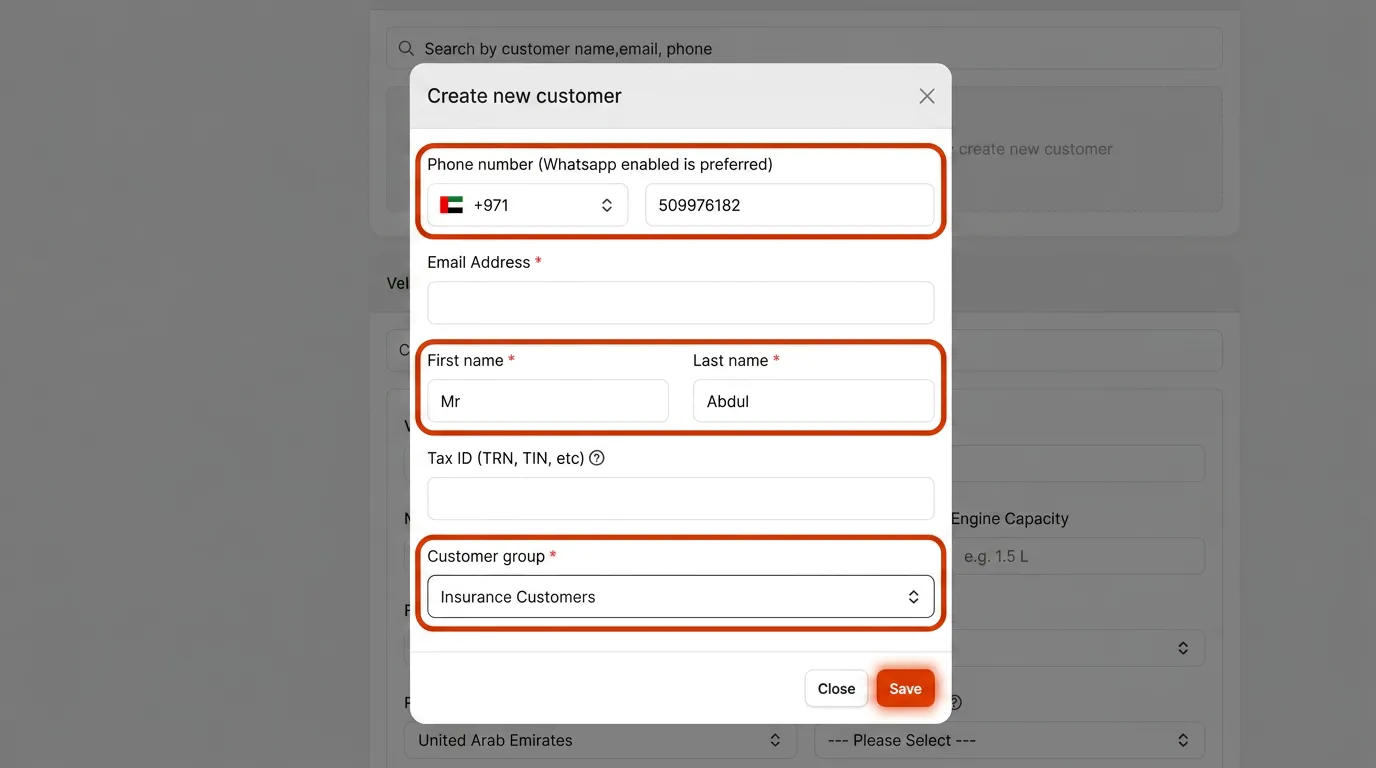
When a customer arrives, workshop staff can quickly search for an existing customer using a mobile number, email address, or name. If the customer is new, a profile can be created within seconds.
The system stores customer information including contact details, WhatsApp number, email address, tax information, and customer type. Workshops can organize customers into groups such as retail customers, fleet customers, corporate accounts, and insurance companies.
Having customer information properly recorded from the beginning ensures future visits can be managed efficiently.
Step 2: Register The Vehicle
After the customer has been created, the next step is registering the vehicle.
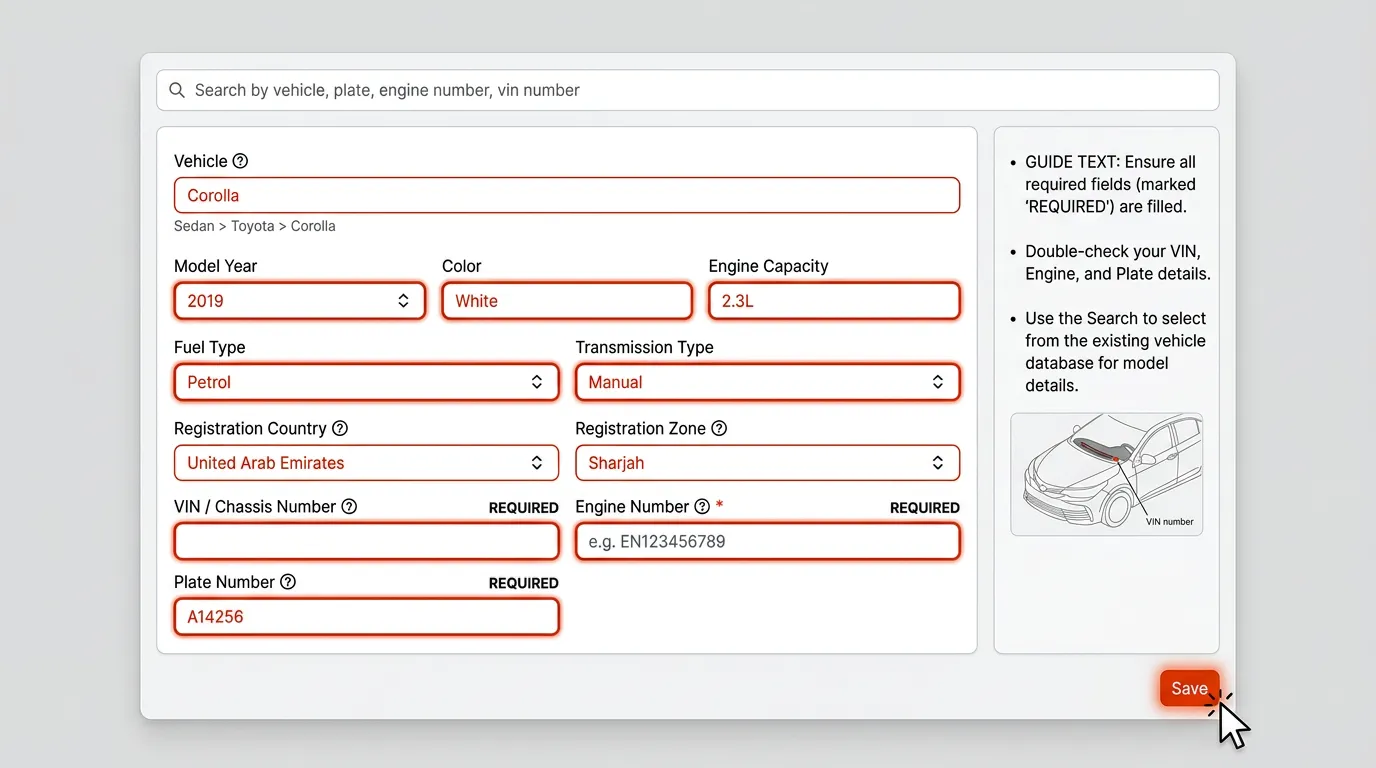
The workshop records important vehicle information including make, model, year, engine capacity, fuel type, transmission type, VIN number, engine number, registration details, and plate number.
This information becomes part of the vehicle's permanent record and can be accessed whenever the customer returns for future service or repairs.
Step 3: Create The Workshop Job
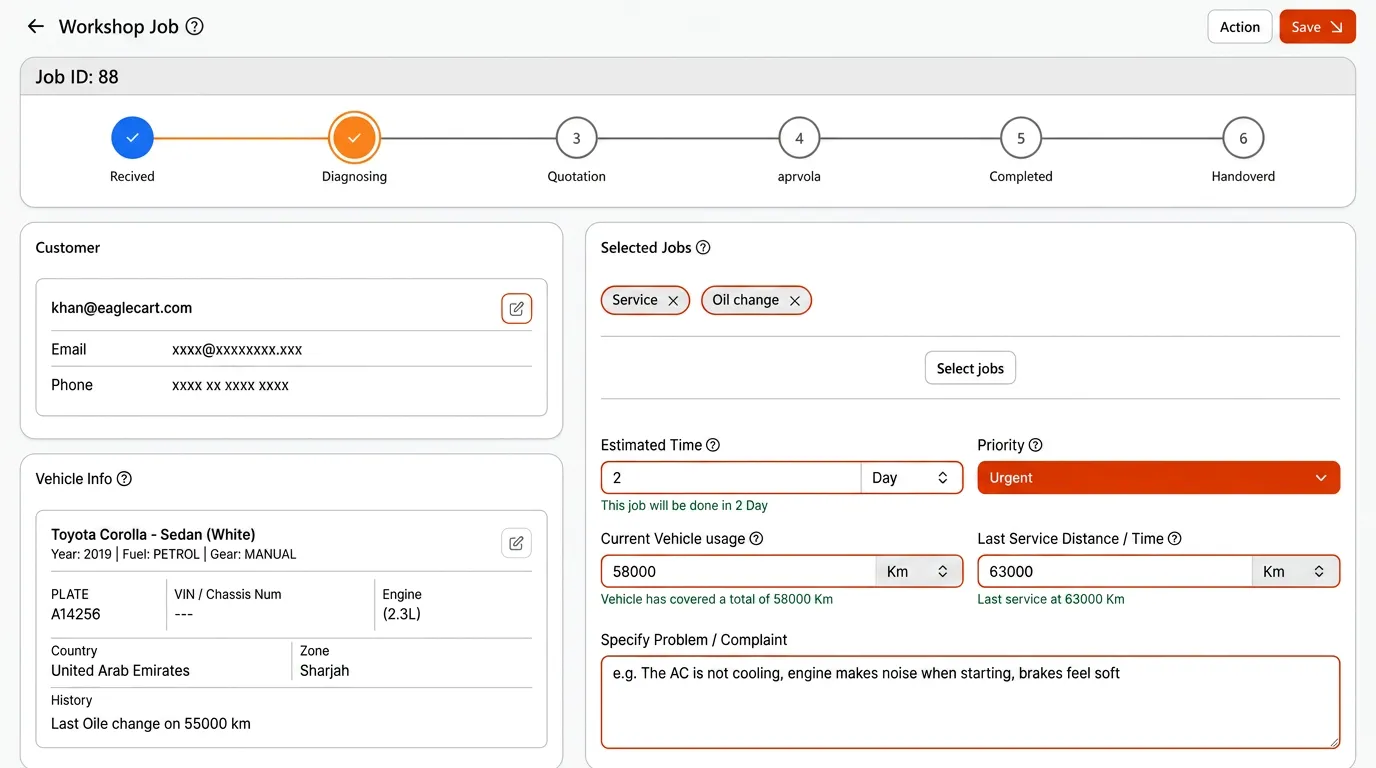
Once the customer and vehicle are registered, a new workshop job can be created.
The service advisor selects the required services, enters the vehicle mileage, records customer complaints, defines the job priority, and estimates the completion time.
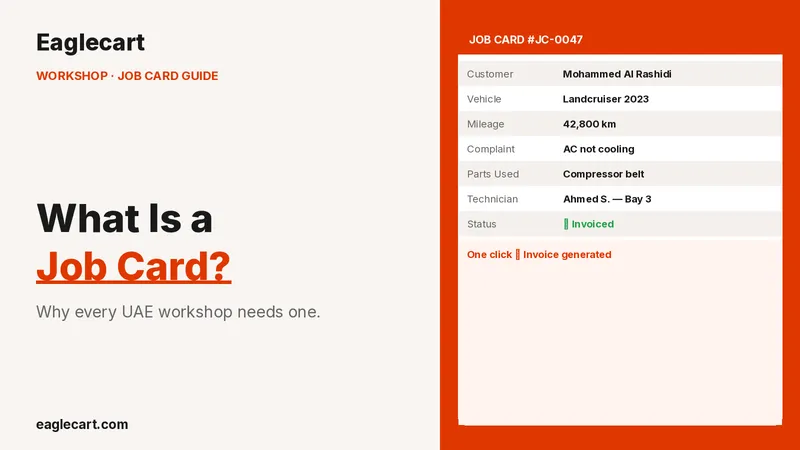
At this point, the vehicle officially enters the workshop workflow and a digital job card is created.
Step 4: Inspect The Vehicle Before Repairs Begin
Before any work starts, the vehicle should be inspected carefully.
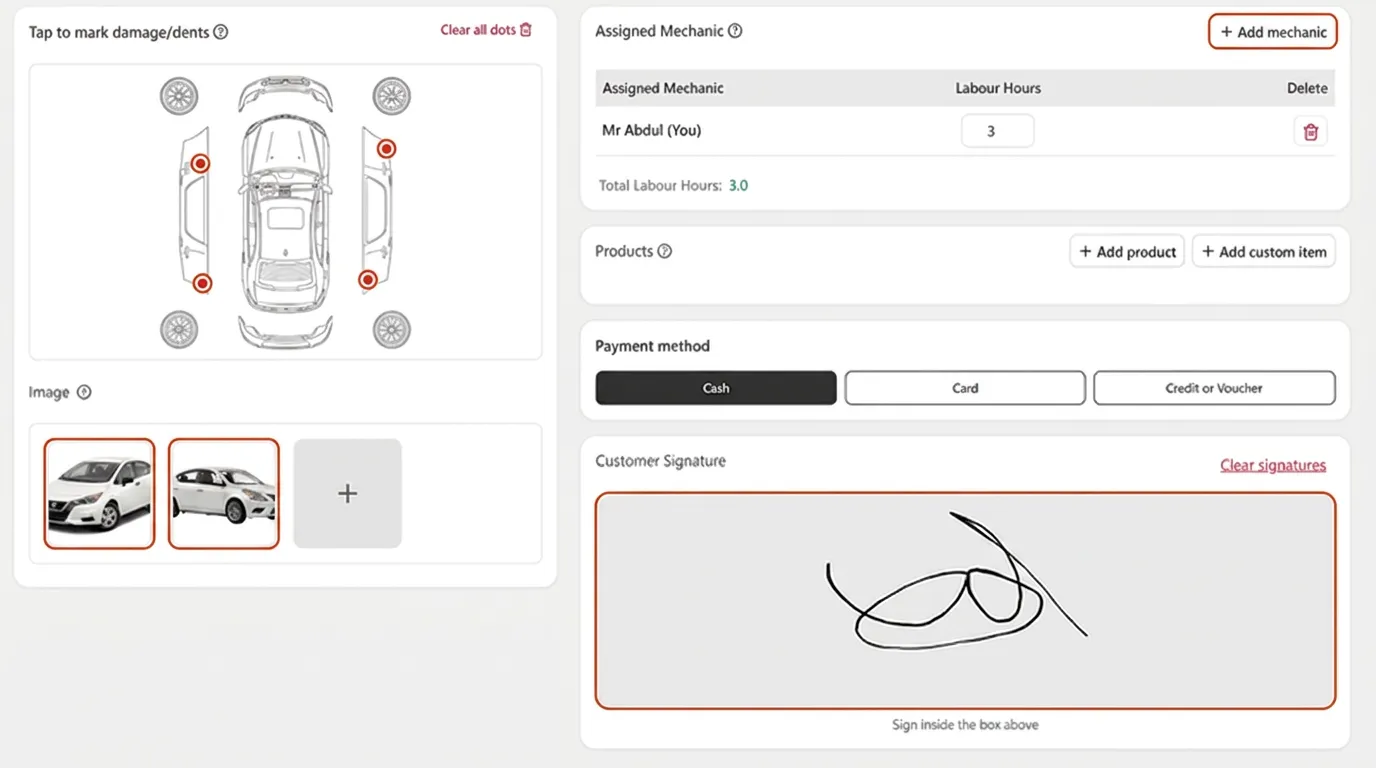
Using a tablet, workshop staff can inspect the vehicle directly beside the customer. Existing dents, scratches, paint damage, broken components, and other observations can be recorded immediately.
The system allows staff to mark damage directly on a digital vehicle diagram and document inspection notes.
This protects both the customer and the workshop by creating a clear record of the vehicle's condition before repairs begin.
Step 5: Upload Vehicle Photos And Collect Digital Signature
A complete inspection should include photographs and customer approval.
Using the tablet camera, workshop staff can capture photos of the vehicle and attach them directly to the job record. Customers can then review the inspection report and sign directly on the tablet.
The digital signature becomes part of the job history and remains available for future reference.
This creates a professional and transparent vehicle check-in process.
Step 6: Assign Technicians To The Job
After the inspection is completed, technicians can be assigned to the repair.
Workshop managers can assign one or more mechanics, record labour hours, and define responsibilities for each technician.
This allows managers to monitor productivity and understand who is responsible for every vehicle currently being repaired.
Step 7: Add Parts And Services
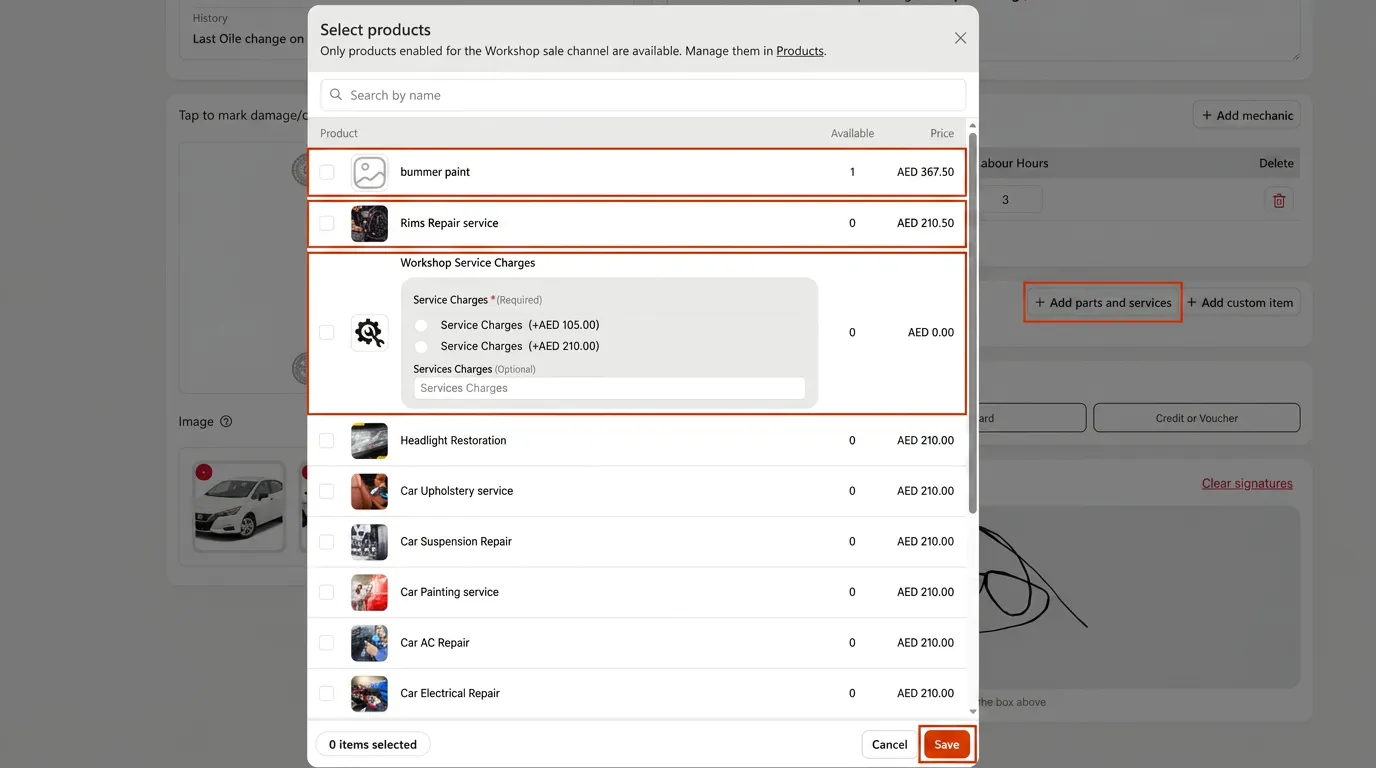
Once the vehicle has been diagnosed, the required parts and services can be added to the job.
Parts are selected directly from inventory while labour services can be added from predefined workshop services.
Because everything is linked to workshop inventory and pricing, all costs remain accurate and ready for billing.
This eliminates manual calculations and reduces invoicing mistakes.
Step 8: Create A Professional Quotation
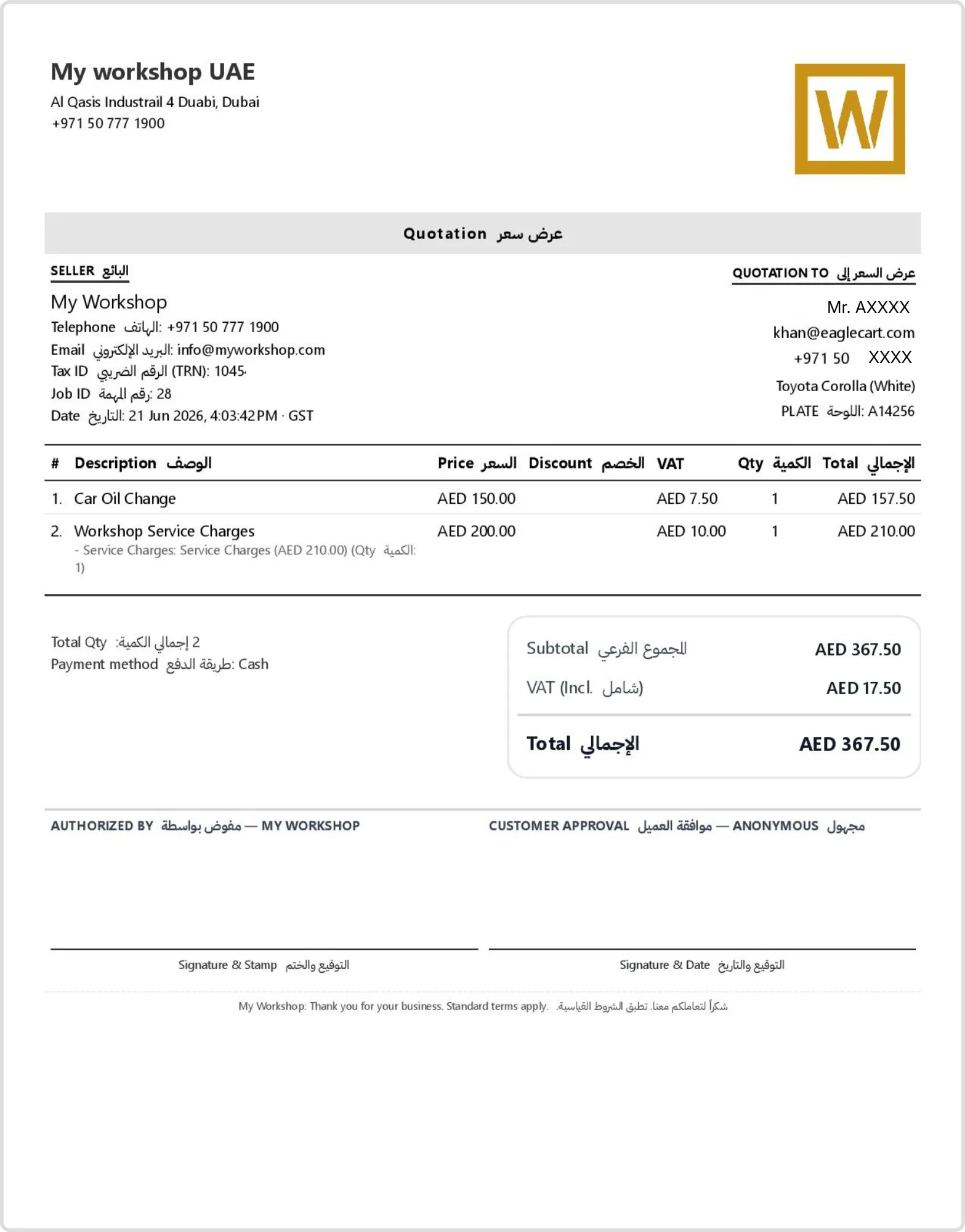
After diagnosis is complete, the workshop can generate a detailed quotation.
The quotation includes labour charges, spare parts, VAT calculations, quantities, and the total repair cost.
Customers receive a professional document that clearly explains the expected repair expenses before any work begins.
This improves transparency and helps avoid misunderstandings.
Step 9: Print The Job Card For Technicians
Many workshops prefer providing technicians with a printed job card.
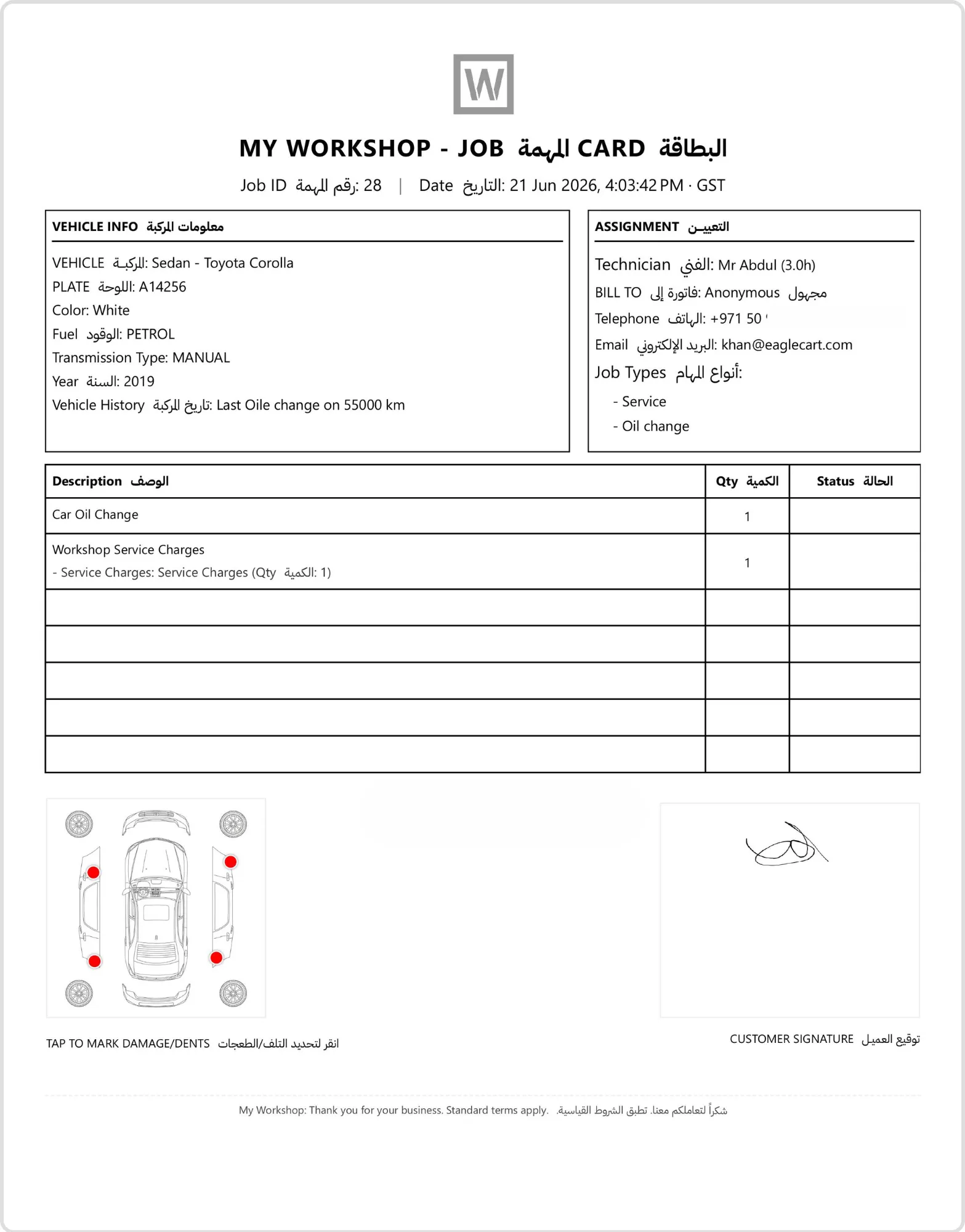
The system can generate a professional job card containing customer information, vehicle details, inspection results, assigned work, damage markings, and customer signatures.
Workshops that prefer a paperless process can use tablets instead of printed job cards.
Step 10: Move The Job Through Every Workshop Stage
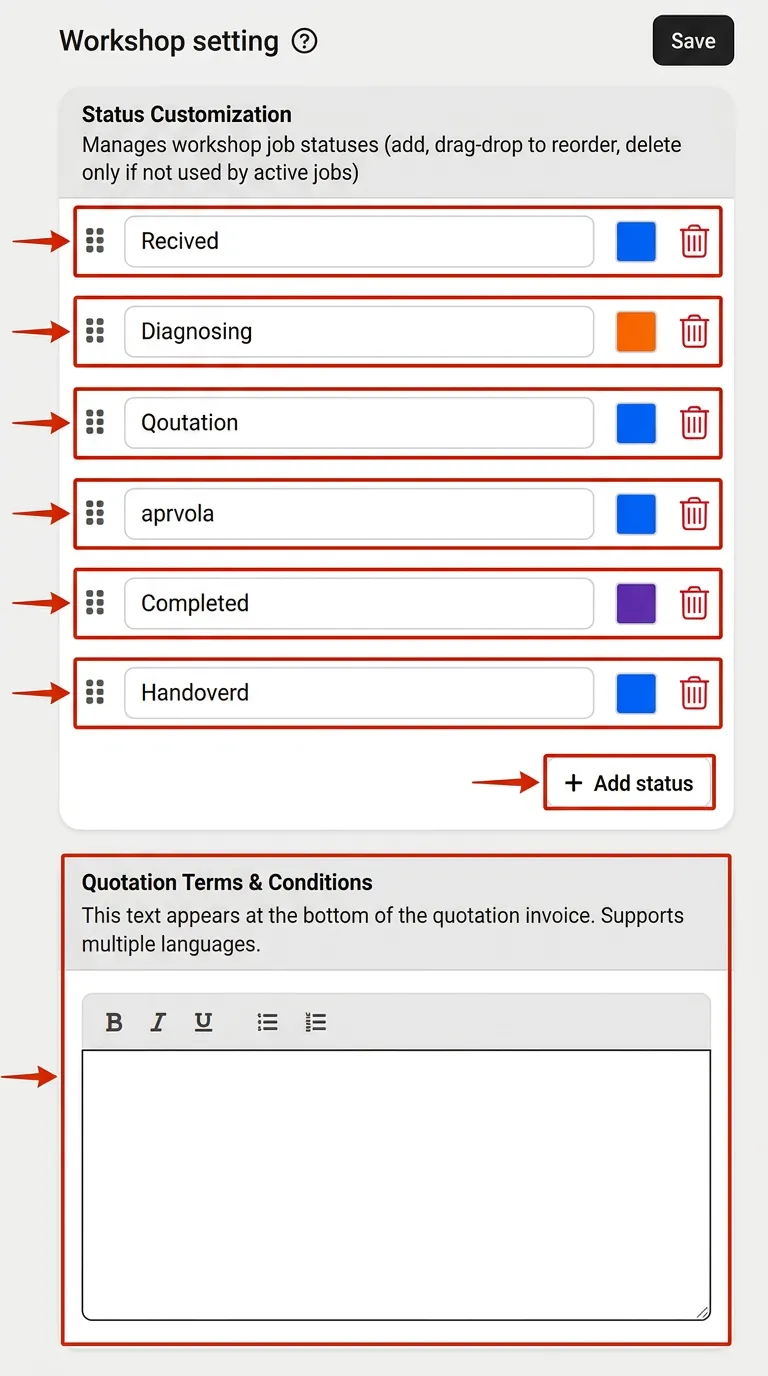
As repairs progress, the job moves through different workflow stages.
Common workshop stages include:
Received
Diagnosing
Quotation
Approval
Completed
Handover
Workshop owners can customize these statuses to match their own workflow.
Managers can instantly see where every vehicle is within the repair process.
Step 11: Print Job Cards, Quotations And Invoices
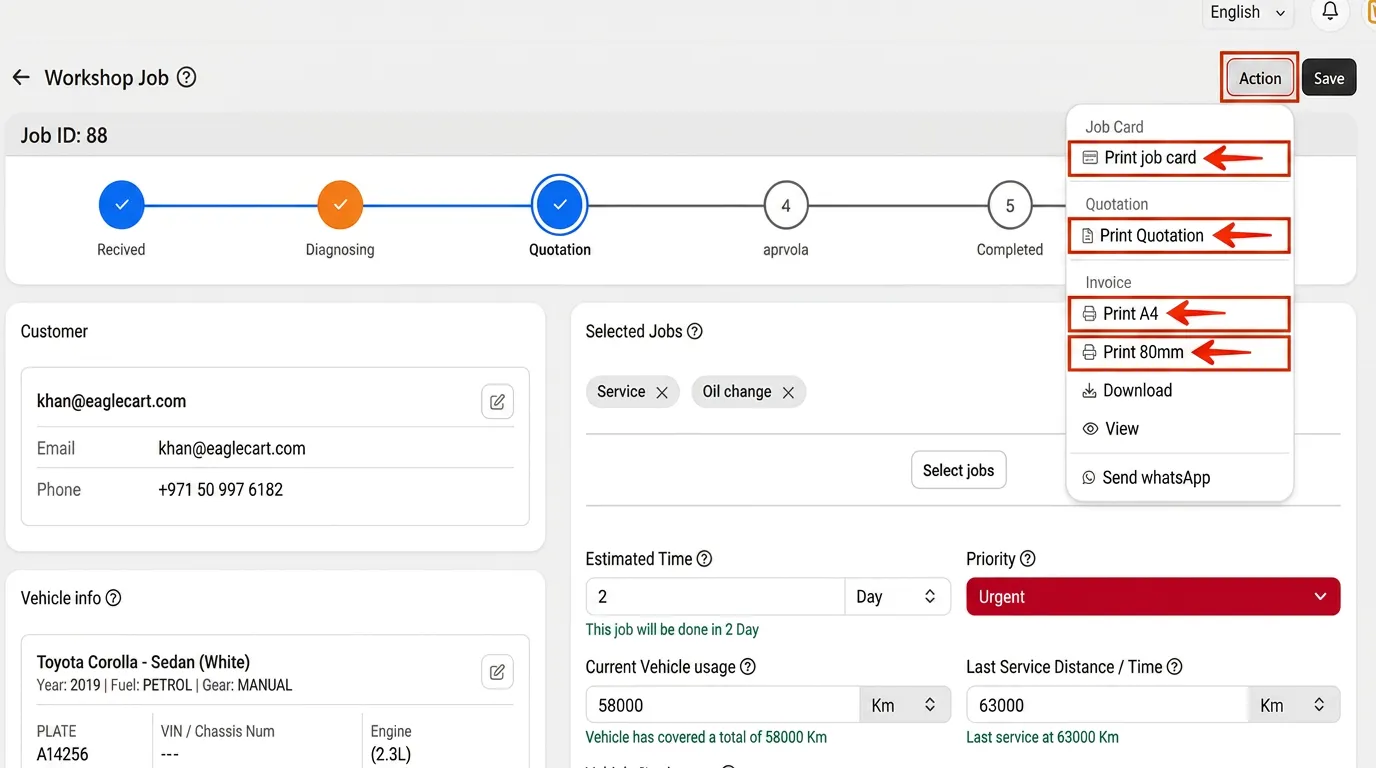
Workshops often need different types of documents during the repair process.
The system supports:
Job Card Printing
Quotation Printing
A4 Invoice Printing
80mm Thermal Receipt Printing
PDF Downloads
WhatsApp Sharing
This gives workshops the flexibility to operate using either paper-based or digital workflows.
Step 12: Generate The Final Invoice
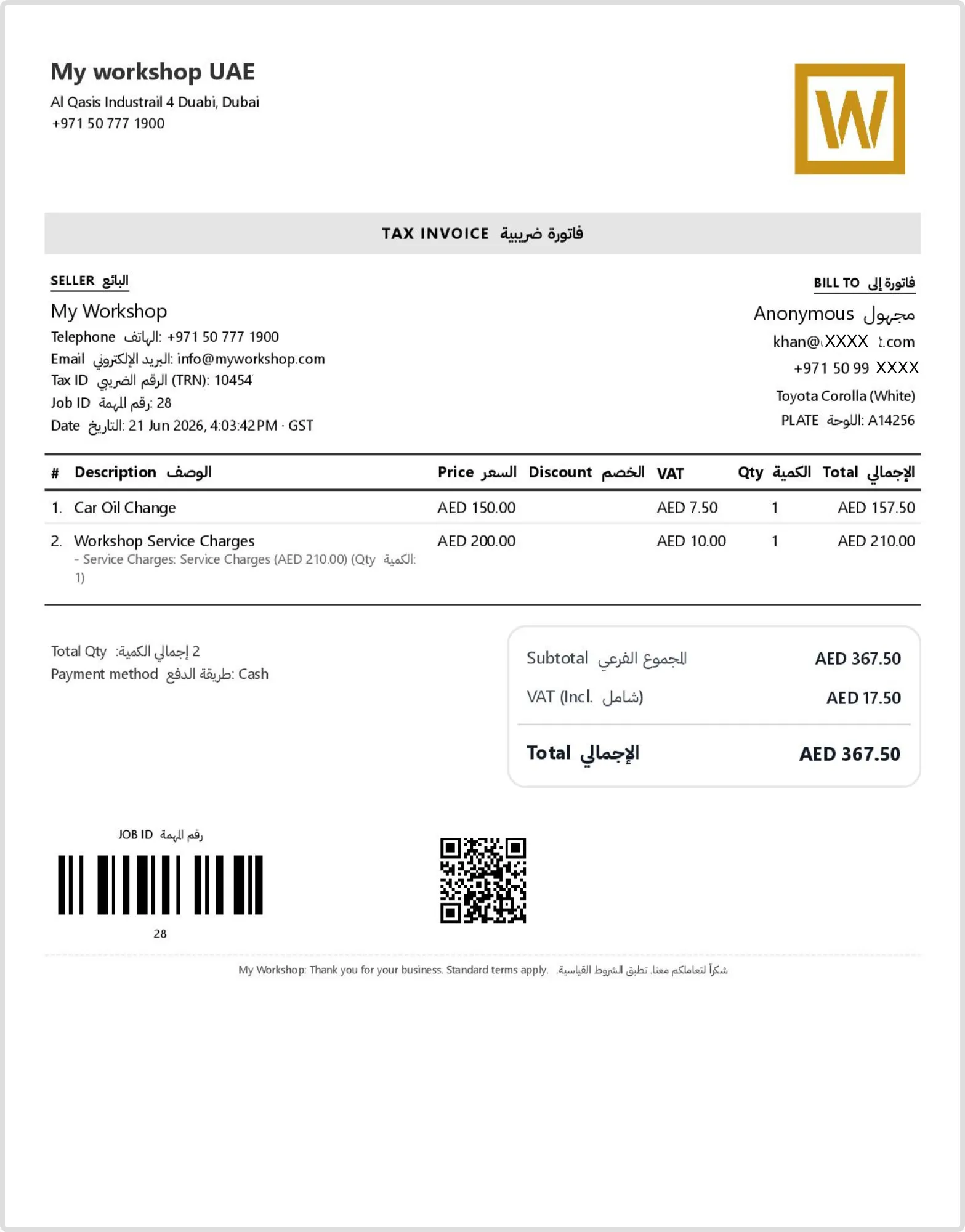
Once repairs are complete, the system automatically generates a VAT-compliant invoice.
The invoice includes customer information, vehicle details, labour charges, spare parts, taxes, payment method, and totals.
Because all information is pulled directly from the workshop job, there is no need for duplicate data entry.
This saves time while improving billing accuracy.
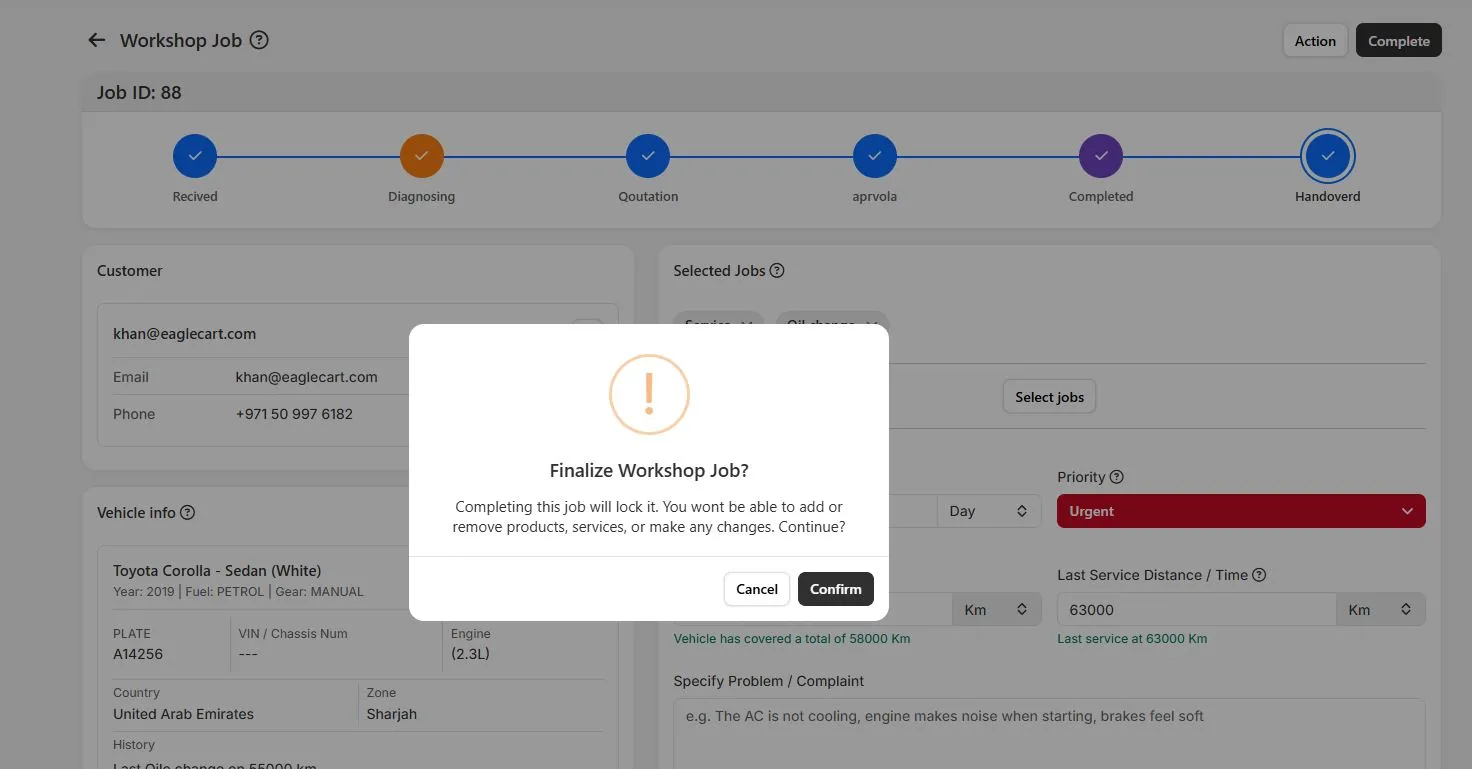
Step 13: Complete The Job And Handover The Vehicle
When repairs are finished and payment is received, the workshop can complete the job.
The repair record becomes locked, ensuring no unauthorized changes can be made after completion.
The vehicle is then marked as handed over to the customer while the complete repair history remains permanently available.
Step 14: Automatically Convert The Job Into A Sale
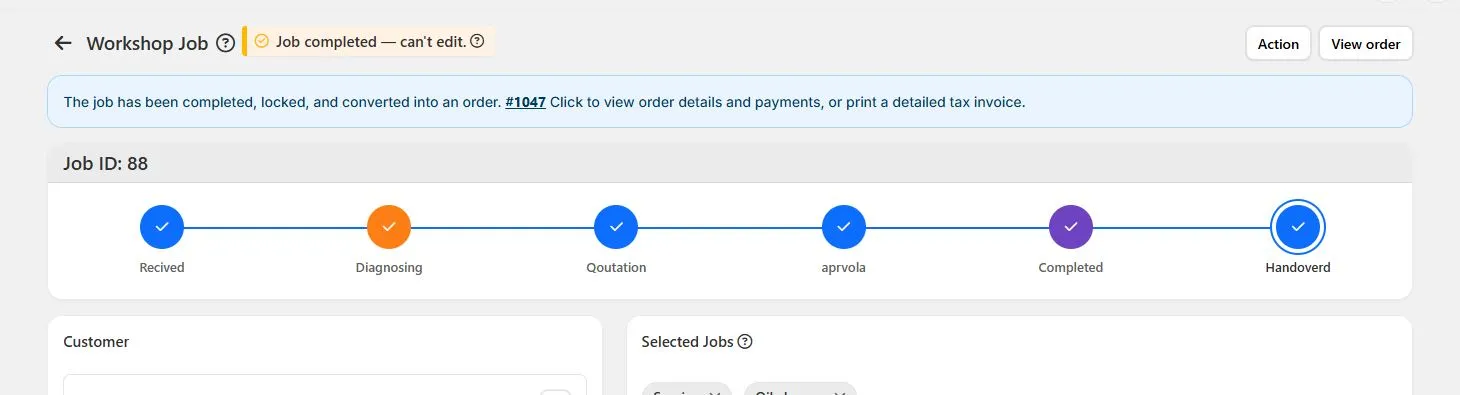
Unlike many traditional workshop systems, completed jobs automatically become sales orders.
There is no need to manually create another invoice or sales transaction.
Revenue, payments, customer information, and repair history remain connected within a single platform.
This improves reporting accuracy and reduces administrative work.
Step 15: Monitor All Active Workshop Jobs
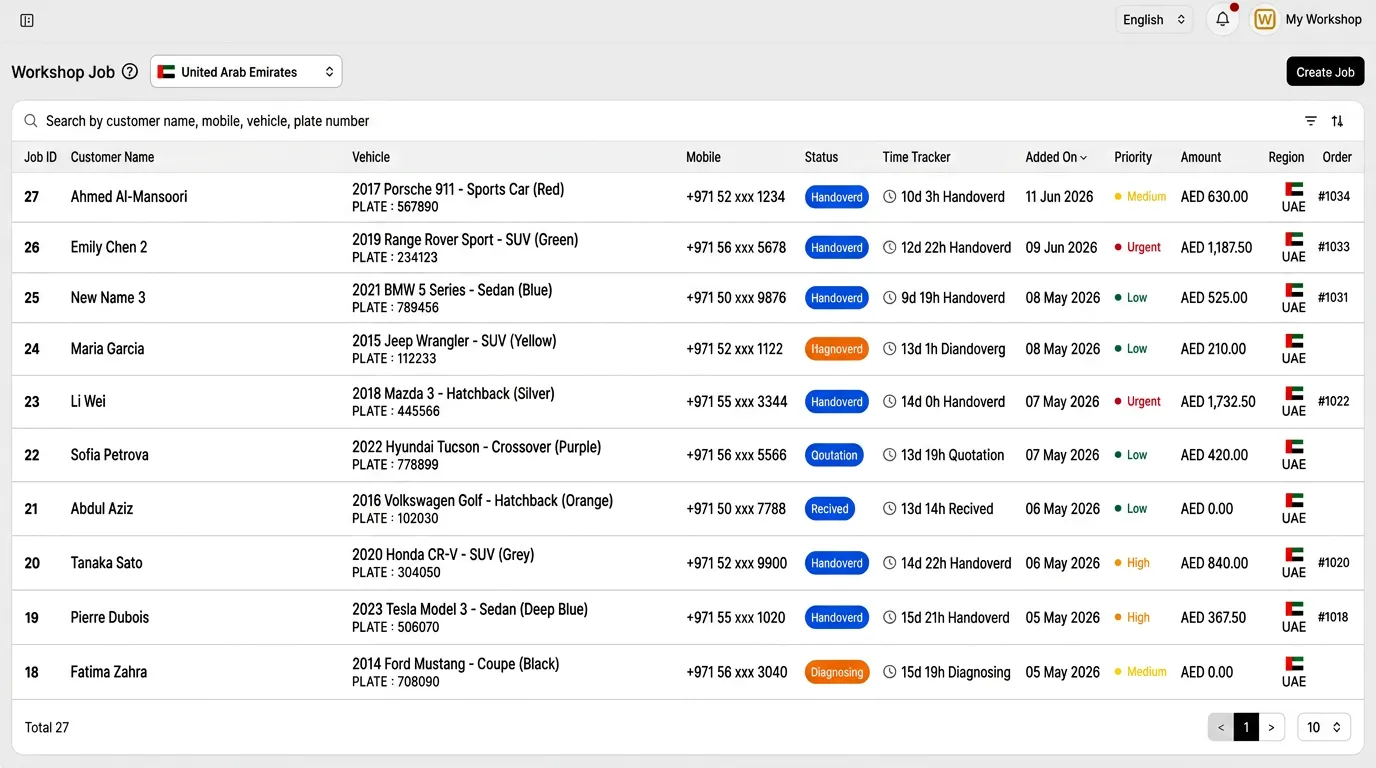
Workshop managers need visibility into all active repairs.
The workshop job list provides a complete overview of current jobs, showing customer information, vehicle details, repair status, priority level, time tracking, job value, and assigned regions.
This allows managers to monitor dozens or even hundreds of active repairs from a single screen.
Step 16: Analyze Workshop Performance
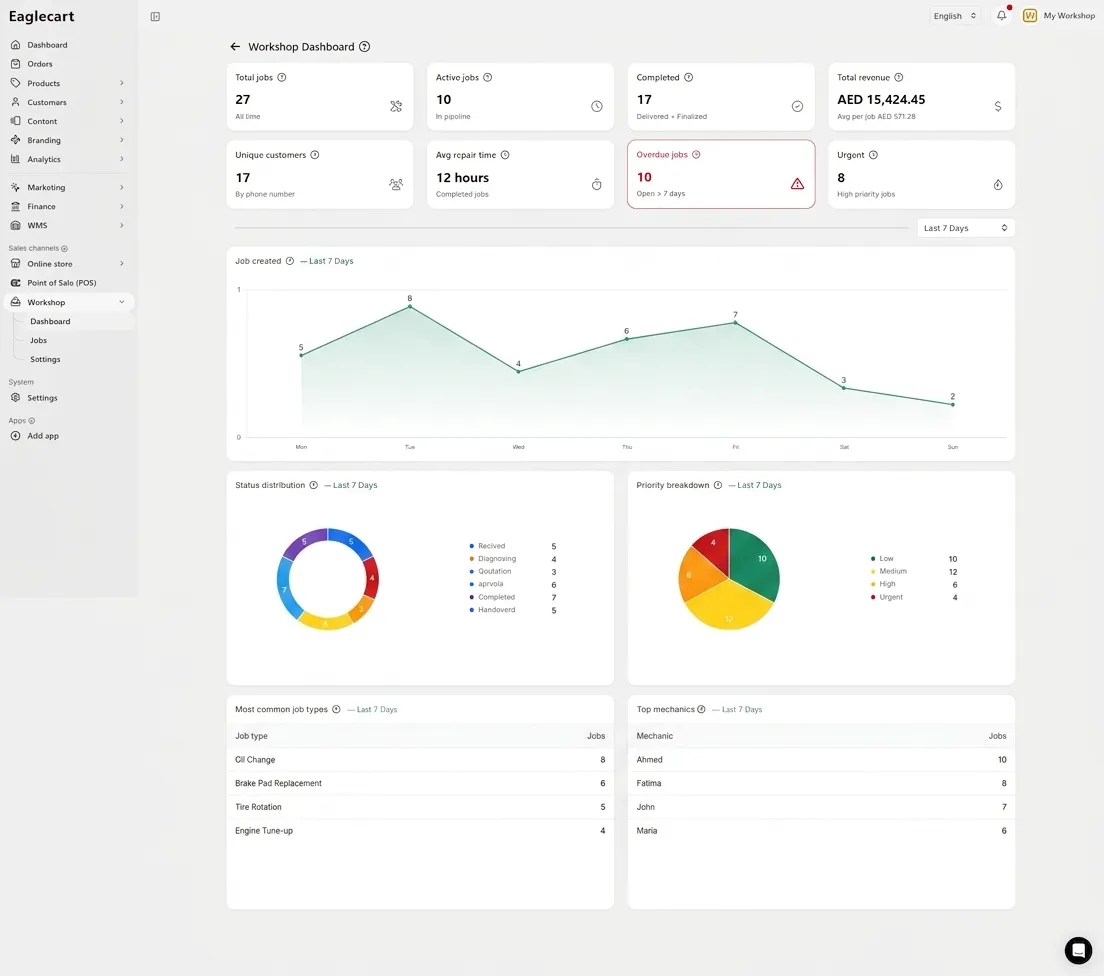
Once jobs are flowing through the workshop, management needs visibility into business performance.
The dashboard provides real-time insights including:
Total jobs
Active jobs
Completed jobs
Revenue
Average repair time
Overdue jobs
Priority breakdown
Most common services
Top-performing mechanics
These insights help workshop owners make informed business decisions based on actual operational data.
More Than Just Garage Management Software
Most workshop systems focus only on repair operations.
Eaglecart goes further by helping workshops build their online presence as well.
Workshops can create a professional website, showcase services, display spare parts, receive inquiries through WhatsApp, publish contact information, and help customers find their location online.
This means the same platform that manages daily workshop operations can also help attract new customers and grow the business.
Frequently Asked Questions
What is garage management software?
Garage management software helps workshops manage customers, vehicles, job cards, quotations, invoices, payments, and daily operations from one system.
Can garage management software track vehicle history?
Yes. It stores previous repairs, service history, mileage records, quotations, and invoices for every vehicle.
Can garage software create quotations?
Yes. Workshops can create professional quotations with labour charges, spare parts, taxes, and discounts.
Can garage management software generate VAT invoices?
Yes. It can automatically generate UAE VAT-compliant invoices with customer, vehicle, and payment details.
How much does garage management software cost in UAE?
Most garage management software starts from around AED 99 per month, depending on features and users.
Is garage management software suitable for small workshops?
Yes. It helps small workshops organize jobs, customers, vehicles, quotations, and invoices more efficiently.
What are the most important features in garage management software?
The most important features include job cards, vehicle history, quotations, invoicing, inspections, technician assignment, and reporting.
Can garage management software manage job cards?
Yes. Digital job cards allow workshops to track vehicle details, assigned work, labour hours, parts used, and job progress.
Can garage management software handle vehicle inspections?
Yes. Workshops can record vehicle damage, upload photos, add notes, and collect customer signatures digitally.
Why do UAE workshops need garage management software?
Garage management software improves efficiency, reduces paperwork, tracks vehicle history, and helps workshops provide faster and more professional customer service.
Start Free Account
Create customers, register vehicles, perform inspections, collect digital signatures, assign technicians, manage parts, generate quotations and invoices, monitor workshop performance, and build your workshop website from one platform with Eaglecart.