
Workshop: Run Jobs, Vehicles, and Mechanics on One Platform
A new Workshop sales channel for service businesses to create jobs, log vehicles and customers, assign mechanics, track status, and print quotations and invoices, with its own dashboard.
Workshop
Eaglecart now includes a full Workshop section built for service businesses that work on jobs rather than just orders. It brings your customers, vehicles, mechanics, job status, and billing into one place, so a job moves from intake to handover without leaving the platform.
Enable the Workshop channel
Workshop is a sales channel you switch on when you need it. Go to Settings > Sales Channels and enable Workshop, and the section appears in your dashboard. Keeping it behind a channel toggle means stores that do not run a workshop stay uncluttered, while service businesses get the full module the moment they turn it on.
Create a job
Every piece of work starts as a job. Create a job to open a single record that holds everything related to that service, from the customer and vehicle to the assigned mechanic, status, images, and final billing. The job is the spine the rest of the workflow hangs on.
Add the customer
Attach a customer to the job so the work is tied to the person it belongs to. Their details carry through the job and onto the quotation and invoice, so you are not re-entering the same contact at billing time.
Add the vehicle
Record the vehicle the work is being done on, kept against the job so you always know exactly what came in. This gives service businesses the vehicle-level history that order-based systems do not capture.
Attach images
Add images to the job to document condition and work. Photographs taken at intake and during the job give you a clear record of the vehicle's state, useful for the customer, for the mechanic, and for resolving any question after handover.
Assign a mechanic
Assign a mechanic to the job so responsibility is clear and the work is accounted for. You always know who is handling what, and the job carries that assignment through to completion.
Track and customize status
Move each job through a status that reflects where the work actually stands, so nothing stalls unnoticed. Workshop also includes a setting to create multiple statuses of your own, so the stages match how your shop really operates rather than a fixed, generic list.
Print quotations and invoices
Produce a quotation before work begins and an invoice when it is done, and print both directly from the job. Billing is generated from the job itself, so the customer, vehicle, and work are already filled in and consistent across every document.
A dedicated workshop dashboard
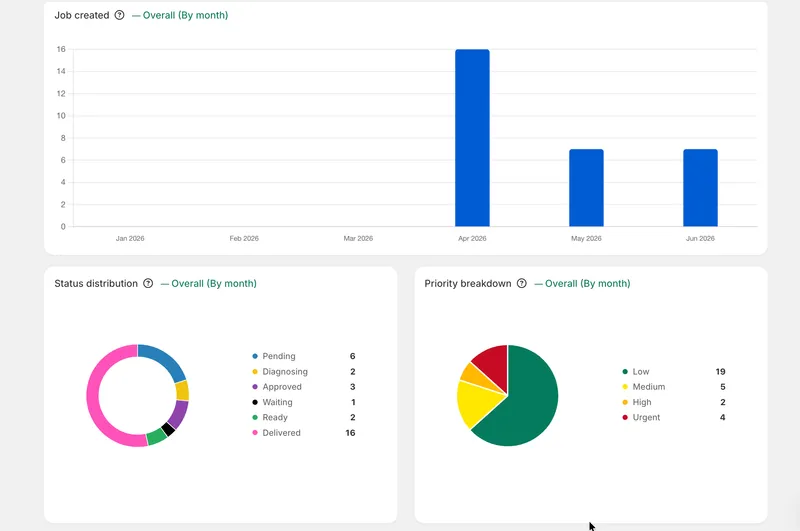
Workshop comes with its own dashboard, giving service businesses a focused view of their jobs and activity instead of a generic store overview, so the people running the shop see exactly what matters to them.


