
Introducing the payments page
Connect Stripe, take cash on delivery, add your own method, and tune payments per region — all in one place.
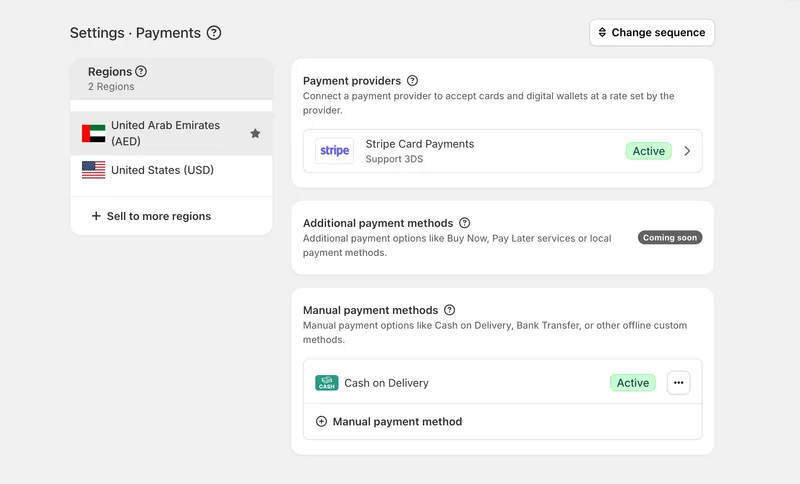
One place to manage how you get paid
We've added a dedicated payments page that brings every way you accept money into a single screen. Instead of scattered settings, you now have one clear home for connecting providers, switching methods on or off, and deciding how customers pay at checkout.
Connect Stripe
You can connect Stripe to start accepting card payments online. Once it's linked, card payments flow through your own Stripe account, with the security and reach of one of the most widely used processors — no custom integration work on your side.
Cash on delivery and your own methods
Prefer to keep it simple? Turn on cash on delivery so customers can pay when the order arrives. You can also add a custom payment method to cover bank transfers, wallets, or any arrangement you offer locally, giving shoppers options that match how they actually like to pay.
Sell across regions
Payments can be tailored by region, so the methods a customer sees fit where they're buying from. As you expand into new markets, you can offer the right payment options in each one instead of forcing a single setup on everyone — making it easier to grow beyond your home market.


