
Media Manager: reimagined
Faster to browse, easier to search, and built for teams managing thousands of files.
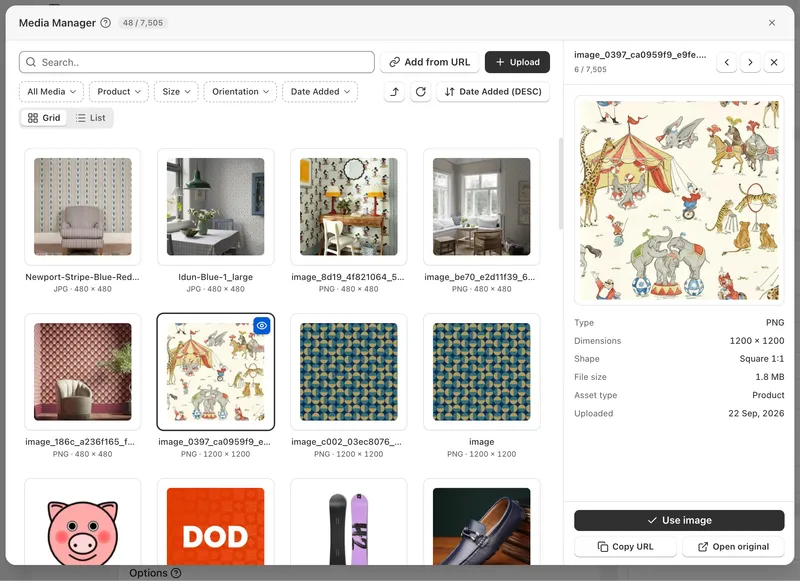
Your media library just got a major upgrade
Faster to browse, easier to search, and built for teams who manage hundreds or thousands of files every day.
A bigger, beautiful workspace
A near full-screen design that's clean, crisp and effortless to use, in light and dark mode, with full Arabic support.
Instant loading, endless scrolling
Opens immediately and loads more as you scroll. No page clicking, no waiting. A live counter shows exactly where you are.
Grid or List: your choice
Browse large visual tiles, or switch to List view for size, dimensions, shape and upload date at a glance.
Find any file in seconds
Powerful filters for size, orientation, date added, media type and asset type, combined with search and smart sorting.
Preview before you choose
Open any file in a detailed side panel. Videos play instantly, and you can flip through files with your arrow keys.
Full-screen zoom
Click to view in full screen and zoom right into the finest details.
Upload in a flash
Drag and drop, paste screenshots with Ctrl+V, and track every file with its own live progress bar.
Add an image straight from a link
Paste an image URL — say, one from another website or a supplier's product page — and it lands in your library instantly, ready to use. No downloading it first, no re-uploading.
Built for mobile
A smooth, thumb-friendly bottom sheet with menus that open right where you tap.
Available now
Wherever you choose media: MON Studio theme builder, products, categories, banners, pages and the text editor.


